

10 Best BMW Coding Laptop Cables of 2026 for Reliable F-, G-, and E-Series Programming

Choosing the right BMW coding laptop cable can make the difference between a smooth coding session and a frustrating compatibility issue. The best option depends on your chassis, software, and the laptop ports you actually use.
Below, we focus on reliable cables for BMW E-, F-, and G-Series coding, with an eye toward stable connections, broad software support, and practical buying value in 2026.
Best 10 Bmw Coding Laptop Cable Picks for 2026
Best ENET for F/G Series
OHP ENET Bimmercode OBD2 Cable
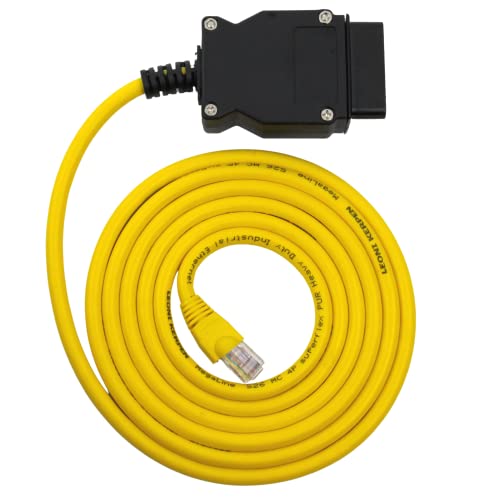
- Works with Bimmercode, E-SYS, and ISTA+
- Shielded CAT5e build for stable data transfer
- Fits BMW F, I, and G series ENET coding
Best For: BMW owners coding supported F/G/I series cars with a laptop-based ENET setup.
Best for E-Chassis Coding

- FT232RL-based interface for BMW diagnostics and coding
- Supports INPA, NCS Expert, Tool32, and common E-series cars
- Switchable design helps broaden vehicle compatibility
Best For: DIY BMW owners who need a laptop cable for E-chassis diagnostics and light coding.
Best for BMW F-Series Coding
ENET OBD2 Cable for BMW F-Series

- Supports E-SYS, ISTA+, Bimmercode, and Bootmod3
- 6.6 ft cable offers easy reach from laptop to car
- Built with shielded RJ45 and durable OBD connector
Best For: BMW owners who want a simple ENET cable for laptop-based coding and diagnostics.
Best for BMW Coding
LZLRUN K+CAN K+DCAN USB Interface
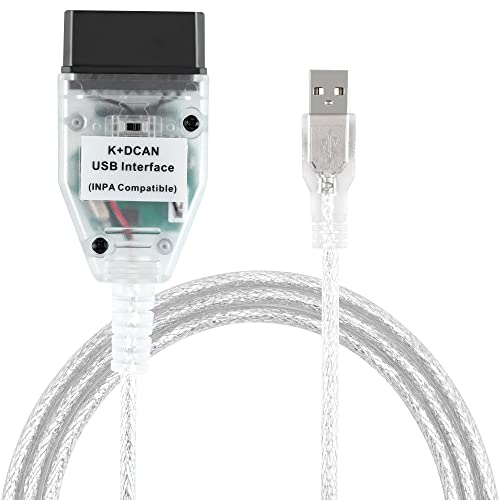
- Switchable K-line and D-CAN support
- FT232RL chip for fast response
- Works with NCS Expert and Tool32
Best For: BMW owners and DIYers who want a laptop-based diagnostic and coding cable.
Best for BMW F/G-Series Coding
ENET Cable with USB-C/USB-A Adapter

- Includes ENET cable plus USB-C and USB-A adapter
- Compatible with ISTA, INPA, E-Sys, and Bootmod3
- Durable build with shielded RJ45 and flexible OBD connector
Best For: BMW owners needing a reliable ENET cable for coding, diagnostics, and CarPlay activation on compatible F/G-series cars.
Best for BMW DoIP
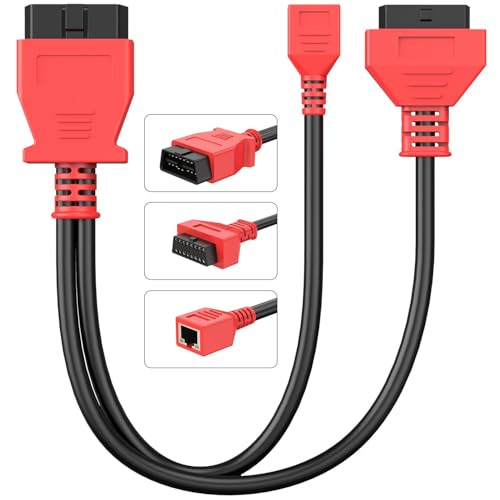
- Enables Ethernet/DoIP communication for BMW coding and programming.
- Made for BMW F- and G-Series vehicles.
- Pairs with compatible Autel scanners and includes OBD/RJ45 connectivity.
Best For: BMW owners and technicians who already use Autel scanners and need a cable for F-/G-Series coding and diagnostics.
Best for E-Series Coding
K DCAN Bimmercode USB OBD2 Cable

- 1998-2016 E-Series compatibility
- Supports INPA, ISTA+, Rheingold, and Bimmercode
- Simple USB laptop-based setup
Best For: DIY BMW owners who want a reliable Windows laptop cable for older E-Series coding and diagnostics.
Best for BMW F/G Coding

- Works with many BMW F-series and G-series vehicles
- Supports coding tools like E-SYS and ISTA+
- 2 m length for practical laptop-to-car reach
Best For: BMW DIY coders who already have compatible software and need an ENET interface.
Best for USB-C Coding Setups
ENET OBD2 Cable with USB-C Adapter

- Includes ENET cable and USB-C adapter
- Fits many BMW F-series and some G-series models
- Works with popular coding tools like E-SYS and ISTA+
Best For: BMW owners using a USB-C laptop who need an ENET cable kit for supported F/G-series coding.
Best for F-Series Coding
ENET OBD2 Ethernet Cable for BMW F-Series

- Works with E-SYS, ISTA+, Bootmod3, and Bimmercode
- Shielded 6.6 ft cable for steadier data transfer
- Secure RJ45/OBD2 fit for plug-and-play use
Best For: BMW owners and technicians who need a reliable wired ENET cable for coding and diagnostics.
Best ENET for F/G Series – OHP ENET Bimmercode OBD2 Cable
If you need a dependable bmw coding laptop cable for F, I, or G series BMW work, this OHP ENET cable is built for coding, diagnostics, and module programming through the Ethernet-to-OBD2 interface. It’s a practical pick for owners using Bimmercode, E-SYS, ISTA+, or similar tools on Windows-based setups.
Best For: BMW owners and DIY coders working on F/G/I series vehicles who want a stable ENET cable for laptop-based coding and diagnostics.
Pros:
- Supports popular BMW coding and diagnostic software like Bimmercode, E-SYS, and ISTA+
- Shielded CAT5e build with gold-plated RJ45 and pure copper wiring for reliable transfers
- Designed for F-Series, I-Series, and G-Series BMW models using ENET
- Backed by a 2-year warranty for added peace of mind
Cons:
- Not compatible with E-Series BMWs
- Windows only, unless you run a virtual machine on Mac
- Requires a laptop and compatible BMW software to be useful
For shoppers comparing a bmw coding laptop cable, this is a focused ENET option with the right compatibility for modern BMW coding workflows. It’s not the most universal choice, but for supported F/G-series cars it covers the essentials well.
Best for E-Chassis Coding – Taotao K+CAN USB Cable
If you need a practical BMW coding laptop cable for older and mid-generation BMWs, this Taotao K+CAN interface is built around FT232RL hardware and support for BMW diagnostics, coding, and fault reading. It’s aimed at E-chassis vehicles and works with common tools like INPA, NCS Expert, and Tool32, making it a useful pick for home users who want to do basic coding and module checks without moving up to a pricier interface.
Best For: BMW owners working on E-chassis cars who want a USB cable for coding, diagnostics, and fault clearing from a laptop.
Pros:
- Supports a wide BMW range, including many E-series models from 1998–2019.
- FT232RL chip and switchable design help with compatibility across more vehicles.
- Works with popular BMW software like INPA, NCS Expert, and Tool32.
Cons:
- Software setup can be finicky, and antivirus may block installation.
- Not compatible with macOS, and Windows compatibility can vary.
- Limited for programming; it does not support all control-unit flash tasks.
Overall, this is a solid value option if you want a BMW coding laptop cable for diagnostics and common coding jobs rather than full dealership-style programming. The switch and broad E-series support make it especially handy for DIY owners, but you should expect some setup effort.
Best for BMW F-Series Coding – ENET OBD2 Cable for BMW F-Series
If you need a straightforward bmw coding laptop cable for BMW F-series and newer compatible models, this ENET cable is a practical pick. It connects your laptop to the car’s OBD port for coding, module changes, and diagnostics with tools like E-SYS, ISTA+, Bimmercode, and Bootmod3.
Best For: BMW owners who want a simple ENET cable for laptop-based coding, module access, and compatible diagnostic software.
Pros:
- Compatible with popular BMW coding and diagnostic software
- 6.6 ft length gives extra reach for garage and driveway use
- Durable build with gold-plated, shielded RJ45 connector
- Works with many BMW F-series and some G-series models
Cons:
- Software is not included
- Compatibility depends on your BMW model and software version
Overall, this is a solid bmw coding laptop cable if you want a direct ENET connection without extra complexity. It is best suited to users who already know which software they plan to run and want a durable, flexible cable for BMW coding tasks.
Best for BMW Coding – LZLRUN K+CAN K+DCAN USB Interface
If you need a practical bmw coding laptop cable for BMW diagnostics and coding, this LZLRUN K+CAN K+DCAN cable is a straightforward pick. It supports a wide BMW range from 1998 to 2019, includes a switch for broader compatibility, and uses an FT232RL chip for fast communication with supported software.
Best For: BMW owners and DIYers who want an affordable USB diagnostic cable for coding, flashing, and fault reading with laptop-based tools.
Pros:
- Supports BMW models from 1998 to 2019 with K-line and D-CAN switching
- FT232RL chip helps deliver quick connection and response
- Works with common BMW tools like NCS Expert and Tool32
- Compatible with MHD Flasher on supported Android setups
Cons:
- Requires some technical know-how for setup and use
- May need a USB-C adapter for newer devices
- Not ideal if you want a plug-and-play consumer scanner
For hands-on owners, this bmw coding laptop cable offers solid compatibility and the right hardware features for everyday BMW diagnostic work. It is best viewed as a value-focused DIY tool rather than a beginner-friendly universal scanner.
Best for BMW F/G-Series Coding – ENET Cable with USB-C/USB-A Adapter
If you need a practical bmw coding laptop cable for BMW F- and G-series work, this ENET setup is built for module coding, diagnostics, and common activation tasks like CarPlay. The included USB-C and USB-A adapters make it easier to connect a modern laptop without hunting for extra accessories.
Best For: BMW owners who want a straightforward ENET cable for coding, diagnostics, and CarPlay-related tweaks on compatible F/G-series cars.
Pros:
- Includes ENET cable plus USB-C and USB-A adapter for broader laptop compatibility
- Works with popular BMW software like ISTA, INPA, E-Sys, and Bootmod3
- Heavy-duty build with shielded RJ45, gold-plated connectors, and flexible OBD plug
Cons:
- Only suitable for compatible BMW models, mainly F- and G-series vehicles
- Requires the right software and some know-how to use effectively
Overall, this is a solid bmw coding laptop cable if you want a durable, software-friendly ENET solution rather than a more expensive all-in-one interface. The adapter bundle adds convenience, while the build quality helps it hold up to repeated garage use.
Best for BMW DoIP – Autel ENET OBD2 RJ45 Cable
If you need a bmw coding laptop cable for newer BMW platforms, this Autel ENET adapter is built to bridge Autel scanners with F- and G-Series vehicles over Ethernet/DoIP. It’s a practical add-on for owners and techs who want access to coding, programming, and deeper diagnostics without replacing their existing scan tool.
Best For: BMW owners and technicians using compatible Autel scanners who need an ENET cable for F- and G-Series coding, programming, and diagnostics.
Pros:
- Supports Ethernet/DoIP communication for advanced BMW functions.
- Works with many Autel scanners, including popular MaxiSys and Elite models.
- Designed specifically for BMW F- and G-Series vehicles.
- Compact 12.2-inch cable with plug-and-play setup.
Cons:
- Only works with BMW F- and G-Series applications.
- Requires compatible Autel hardware and may need a USB Ethernet adapter on some devices.
Overall, this is a focused bmw coding laptop cable solution if your workflow centers on BMW DoIP work and you already use Autel equipment. It’s less of a universal cable and more of a purpose-built adapter for getting the right connection on the right cars.
Best for E-Series Coding – K DCAN Bimmercode USB OBD2 Cable
If you need a practical bmw coding laptop cable for older BMW models, this K DCAN USB OBD2 cable is built around 1998-2016 E-Series compatibility and common tools like Bimmercode, INPA, Rheingold, and ISTA+. It’s a straightforward choice for DIY coding, diagnostics, and module access on supported Windows setups.
Best For: DIY BMW owners working on E-Series cars who want a simple USB cable for coding and diagnostics from a Windows laptop.
Pros:
- Works with many BMW E-Series vehicles from 1998-2016
- Supports popular coding and diagnostic software such as INPA and ISTA+
- USB connection keeps setup simple for laptop-based use
Cons:
- Limited to supported older BMW chassis and Windows-based workflows
- Not as plug-and-play as wireless app-based adapters
For owners focused on older BMWs, this bmw coding laptop cable offers the right kind of compatibility without unnecessary extras. It’s a solid pick if your priority is dependable USB access for coding and diagnostics rather than broad, modern OBD app support.
Best for BMW F/G Coding – Autel ENET OBD Cable
If you need a practical bmw coding laptop cable for BMW F-series and G-series work, this Autel ENET cable is a straightforward way to connect your laptop to the car for coding, programming, and module refresh tasks. It is a data-transfer cable, so you’ll still need compatible BMW software, but it can be a solid pick for users who want a simple Ethernet-to-OBD II interface.
Best For: BMW owners and DIY coders working on 2010+ F/G-series vehicles who already have compatible software like E-SYS, ISTA+, or similar tools.
Pros:
- Compatible with many BMW F-series and newer G-series models
- Supports common coding/programming software such as E-SYS and ISTA+
- 6.6 ft / 2 m cable length gives decent reach from laptop to OBD port
- Designed for stable data transmission with tight-fitting connectors
Cons:
- Not compatible with every BMW model, so vehicle matching is important
- Requires separate BMW coding software to be useful
- Results depend on the software and setup, not the cable alone
Overall, this is a focused bmw coding laptop cable for owners who already know their vehicle platform and want a reliable ENET connection rather than an all-in-one scanner. If your BMW is supported and you have the right software, it covers the basics well.
Best for USB-C Coding Setups – ENET OBD2 Cable with USB-C Adapter
If you want a straightforward bmw coding laptop cable for F-series and newer compatible BMWs, this ENET bundle is a practical pick. It includes the 6.6 ft cable plus a USB-C to Ethernet adapter, so you can connect a modern laptop and start coding with supported software like E-SYS, ISTA+, INPA, or BimmerCode-compatible workflows.
Best For: BMW owners using a USB-C laptop who want an all-in-one ENET cable kit for F/G-series coding, diagnostics, and module changes.
Pros:
- Includes both the ENET cable and USB-C adapter in one package
- Works with many BMW F-series and compatible G-series models
- Supports common coding and diagnostic tools like E-SYS and ISTA+
- 6.5 ft length gives you workable reach in the driver’s seat
Cons:
- Not compatible with every BMW model
- Requires separate BMW coding software to actually program the car
- Programming results depend on the software and vehicle support
This is a sensible bmw coding laptop cable if you already know your car is supported and want a simple USB-C-ready setup. It is less about universal compatibility and more about giving BMW F/G-series owners the right physical connection for coding and module access.
Best for F-Series Coding – ENET OBD2 Ethernet Cable for BMW F-Series
If you need a straightforward bmw coding laptop cable for BMW F-series and many G-series models, this ENET OBD2 Ethernet cable is a practical choice. It is built for wired diagnostics and coding with common tools, making it useful for both DIY owners and shop use.
Best For: BMW drivers and technicians who want a plug-and-play ENET cable for coding, diagnostics, and feature tweaks with E-SYS, ISTA+, Bootmod3, and Bimmercode.
Pros:
- Supports popular BMW coding and diagnostic software
- Shielded 6.6 ft cable helps reduce interference and connection drops
- RJ45 and OBD2 connectors provide a secure, stable wired link
- Lightweight, portable, and simple to use
Cons:
- Only works with compatible BMW F/G-series vehicles
- Not a wireless option, so you need a laptop or device with the right setup
This is a solid no-frills bmw coding laptop cable if you want reliable wired communication without extra setup. It stands out for compatibility with mainstream BMW tools and a durable build that should hold up to repeated use.
How We Picked the Best Bmw Coding Laptop Cable
For this roundup, we prioritized Bmw Coding Laptop Cable options that match the most common enthusiast and professional workflows. That means checking chassis compatibility, interface type, adapter usefulness, build quality, and stated support for popular tools such as E-SYS, ISTA+, INPA, BimmerCode, BimmerLink, and Bootmod3.
We also looked for clearer product labeling and practical features like switchable K+CAN/K+DCAN support, FT232RL-based USB interfaces, ENET/RJ45 connectivity, and cable lengths that work well in a garage or driveway setup.
Quick Comparison
In simple terms, ENET cables are the usual choice for BMW F-, G-, and many i-Series coding jobs, while K+DCAN and K+CAN cables are more relevant for older E-Series models and mixed-compatibility workflows. If you need one cable for a newer laptop with USB-C, a kit that includes USB-A and USB-C adapters can save time and reduce dongle clutter.
For buyers who want the most straightforward setup, match the cable to your vehicle generation first, then confirm your software and operating system requirements before you buy.
Key Buying Factors for Bmw Coding Laptop Cable
Vehicle Platform Compatibility
Start with the car, not the cable. BMW E-Series owners usually need a K+DCAN or K+CAN interface, while F- and G-Series coding typically calls for ENET. Some products advertise broad compatibility, but the chassis support is what matters most.
Software and Operating System Support
Make sure the cable is compatible with the software you plan to use and with your laptop OS. A Bmw Coding Laptop Cable may work perfectly with one tool and be a poor fit for another if drivers, interfaces, or protocols do not line up.
Connector Type and Adapters
USB-A remains common, but USB-C is increasingly useful for newer laptops. If your computer only has USB-C ports, a cable bundle with the right adapter can be more practical than buying an additional hub or dongle later.
Build Quality and Cable Length
Look for secure connectors, sturdy jacket material, and enough length to comfortably reach from your laptop to the OBD port. Around 2 meters is usually a good balance for garage use without excessive slack.
Use Case: Diagnostic Versus Coding
Some buyers only need basic diagnostics, while others want coding and flashing capability. Choose a cable that matches your intended task, especially if you plan to use advanced BMW software regularly.
Who Should Buy Which Bmw Coding Laptop Cable?
If you drive an E-Series BMW, a K+DCAN or K+CAN cable is usually the most sensible choice. If you own an F-Series or G-Series model, an ENET cable is typically the safer pick for coding and software communication.
DIY owners who want a simple plug-in setup should favor a straightforward ENET model. More advanced users, or anyone working across multiple BMW generations, may prefer a switchable cable or an adapter-ready bundle that gives more flexibility across laptops and workflows.
In short, the best Bmw Coding Laptop Cable is the one that matches your chassis, your software, and your laptop ports without requiring unnecessary workarounds.
