

10 Best BMW ENET Cables for X3 Coding and Diagnostics in 2026

An ENET cable can connect a compatible BMW X3 to a laptop or adapter for supported coding and diagnostic tasks. The right choice depends on your X3’s generation, your device’s ports, and the software you plan to use.
These 10 options include basic RJ45-to-OBD-II cables, longer leads, and a kit with USB adapters. Before buying, check your vehicle and setup—not just the software names in a listing.
Best 10 Bmw Enet Cable for X3 Picks for 2026
Versatile Software Pick
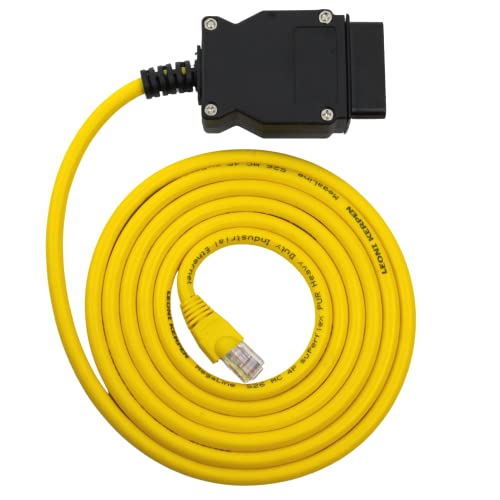
- Listed for F- and G-series X3 models
- Supports BimmerCode, E-SYS, and ISTA+
- Shielded Cat5e cable with copper wiring
Best For: Computer-based coding with a choice of BMW software
Warranty-Minded Pick

- 6.6-foot Ethernet-to-OBD2 cable
- Listed for compatible F- and G-series BMWs
- Stated one-year warranty
Best For: Buyers who value cable length and stated warranty coverage
X3-Listed Option

- X3 explicitly listed in vehicle support
- 6.6-foot shielded Cat5e cable
- Software must be obtained separately
Best For: X3 owners seeking a longer cable for a verified setup
F25-Specific Pick
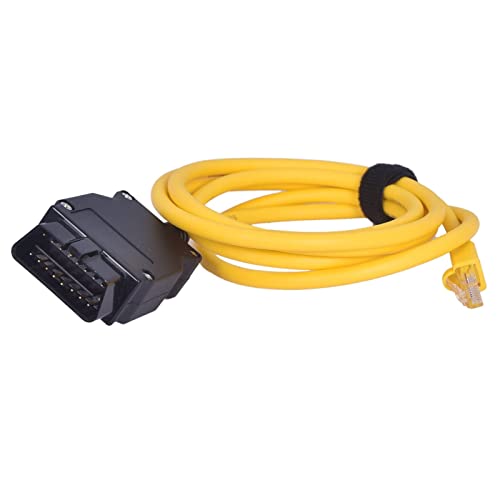
- Explicitly lists the F25 X3
- 2-meter cable with claimed shielding
- Software not included
Best For: F25 X3 owners with compatible coding software
Compact Cable Pick
6.6-Foot ENET OBD2 to RJ45 Cable

- 6.6-foot CAT5e lead
- Shielded RJ45 connector
- Software not included
Best For: Shorter wired setups for compatible BMW module work
Extra-Reach Pick
9.84-Foot ENET Cable for BMW X3

- 9.84-foot cable
- X3 explicitly listed
- Software not included
Best For: X3 owners needing extra laptop-placement flexibility
Adapter Bundle Pick
ENET Cable with USB-C and USB-A Adapters

- USB-C and USB-A adapters listed
- 5-foot CAT5e cable
- X3 listed as compatible
Best For: Computers that need a USB adapter for Ethernet
Durable RJ45 Pick

- Listed for X3 F25 and other F-series models
- Shielded, gold-plated RJ45 connector
- 6.6-foot CAT5e cable
Best For: X3 owners with an Ethernet-equipped computer
F25 Coding Pick

- Explicit X-series F25 listing
- Shielded, gold-plated RJ45 connector
- Flexible 16-pin OBD connector
Best For: F25 X3 owners with an existing coding setup
USB-C Bundle Pick
FENNICA ENET Cable and Adapter

- Includes USB-C-to-Ethernet adapter
- Lists X3/F25 compatibility
- Approximately 6.6-foot CAT5e cable
Best For: X3 owners using a USB-C laptop
Versatile Software Pick – OHP ENET Coding Cable
If you need a BMW ENET cable for X3 coding, the OHP cable is a practical choice for owners using a computer and compatible BMW software. It connects the vehicle’s OBD2 port to Ethernet and is listed for F- and G-series X3 models; confirm your specific vehicle supports ENET before ordering.
Best For: X3 owners who want one cable for coding, diagnostics, and module configuration with supported software.
Pros:
- Lists support for BimmerCode, E-SYS, and ISTA+.
- Shielded Cat5e cable, pure copper wiring, and a gold-plated RJ45 connector.
- Can work with Android devices using an appropriate adapter, sold separately.
Cons:
- Primarily intended for Windows; Mac use may require a virtual machine.
- Not for E-series BMWs, which require a different cable.
Choose this one if software flexibility matters more than a phone-ready setup. Check your X3 generation and the requirements of your chosen coding program first.
Warranty-Minded Pick – Autel 6.6-Foot ENET Cable
This BMW ENET cable for X3 shoppers offers a 6.6-foot Ethernet-to-OBD2 connection for compatible F- and G-series vehicles. Autel positions it as a data link for coding and programming software, not as a standalone programming tool.
Best For: Owners who want a 2-meter cable and a stated one-year warranty.
Pros:
- 6.6-foot length gives you room to position a computer or diagnostic tool.
- Lists compatibility with BMW software including ICOM and ISTA Rheingold.
- Includes a stated one-year warranty and 30-day return or replacement policy.
Cons:
- Compatibility is not guaranteed across all BMW models; verify your X3 first.
- Requires separate, suitable coding software to perform programming.
The warranty is a useful differentiator, but the cable only carries data. Your vehicle, software, and procedure determine what you can actually do with it.
X3-Listed Option – TTXSPP 6.6-Foot ENET Cable
For shoppers seeking a BMW ENET cable for X3 use, this 6.6-foot model explicitly lists the X3 among its supported BMW vehicles. It connects an OBD port to an Ethernet-equipped computer for use with compatible coding and diagnostic software.
Best For: X3 owners who want a 2-meter cable with reinforced connector details and plan to supply their own software.
Pros:
- Explicitly names the X3 alongside F-series and newer G-series models.
- Shielded Cat5e cable has a gold-plated RJ45 connector and pure copper wiring.
- Lists a one-year warranty and support for several BMW software options.
Cons:
- Software is not included.
- You must verify your vehicle, operating system, and software version before use.
This is a sensible shortlist candidate when you want an X3-listed cable with a 6.6-foot reach. Its broad software claims still make compatibility checks essential.
F25-Specific Pick – AntiBreak 2-Meter ENET Cable
If your search for a BMW ENET cable for X3 is specifically about the F25 X3, the AntiBreak cable is worth a look: its compatibility list names the X-series F25. The 2-meter Ethernet-to-OBD2 cable is intended for compatible coding and programming setups.
Best For: F25 X3 owners who have compatible software and want a 2-meter ENET cable.
Pros:
- Explicitly lists the X-series F25.
- Shielded construction and pure copper wiring are claimed for signal transmission.
- Lists a two-year manufacturer warranty.
Cons:
- Software is not included.
- The supplied compatibility list identifies the F25 X3, not every X3 generation.
Its clearest fit is an F25 setup, rather than an unspecified X3. Confirm the vehicle interface and software requirements before buying.
Compact Cable Pick – 6.6-Foot ENET OBD2 to RJ45 Cable
If you need a bmw enet cable for x3 coding or diagnostics, this 6.6-foot OBD2-to-RJ45 option offers a manageable length for working beside the vehicle. The listing includes BMW XSeries among its supported models, but check your X3’s generation and software requirements before buying.
Best For: BMW owners who want a shorter Ethernet connection for compatible module work.
Pros:
- 6.6-foot CAT5e cable is easier to manage than a longer lead.
- Shielded RJ45 connector and flexible 16-pin OBD connector.
- Lists BMW F-Series, XSeries, and G-Series support.
Cons:
- Software is not included.
- RJ45 connection may require a separate adapter for computers without Ethernet.
This is a practical pick if its listed model coverage fits your X3 and you already have suitable diagnostic or coding software. Confirm compatibility before attempting module changes.
Extra-Reach Pick – 9.84-Foot ENET Cable for BMW X3
This bmw enet cable for x3 buyers provides 9.84 feet of reach between the vehicle’s OBD port and an Ethernet-equipped computer. The listing explicitly names the X3 and describes support for BMW module programming, though you should verify compatibility with your specific vehicle and chosen software.
Best For: X3 owners who need more room to position a laptop during compatible coding or diagnostic work.
Pros:
- 9.84-foot length offers more workspace flexibility.
- Lists the X3 alongside BMW F-Series and G-Series models.
- CAT5e cable with a shielded RJ45 connector and flexible 16-pin OBD connector.
Cons:
- Software is not included.
- RJ45-only connection may need an adapter on computers without an Ethernet port.
Choose this one over a shorter lead when laptop placement matters. Its stated X3 support is useful, but the listing does not identify every compatible X3 year or generation.
Adapter Bundle Pick – ENET Cable with USB-C and USB-A Adapters
For shoppers comparing a bmw enet cable for x3 use, this bundle pairs a 5-foot OBD2-to-Ethernet cable with USB-C and USB-A adapters. The supplied notes list X3 compatibility and describe a CAT5e cable with a shielded RJ45 connector.
Best For: BMW owners who want adapter options for a computer without a built-in Ethernet port.
Pros:
- Includes USB-C and USB-A adapters according to the product description.
- Lists the X3 among supported BMW models.
- Gold-plated connectors and a flexible 16-pin OBD connector are described in the notes.
Cons:
- 5-foot cable provides less reach than the other options here.
- The supplied notes do not identify specific supported X3 years or generations.
The included adapters make this the most convenient of these three for varied computer ports. Verify your X3 and software setup before relying on it for a particular coding task.
Durable RJ45 Pick – AUTOXBERT 6.6-Foot ENET Cable
If you need a bmw enet cable for x3 coding or diagnostics, this AUTOXBERT option pairs a 6.6-foot OBD-to-RJ45 connection with a shielded CAT5e cable. The listed BMW coverage includes the X3 and F25, along with other F-series models.
Best For: X3 owners using an Ethernet-equipped computer and compatible BMW coding software.
Pros:
- 6.6-foot length provides room to position a computer near the vehicle.
- Shielded, gold-plated RJ45 connector and abrasion-resistant CAT5e cable.
- Lists support for E-SYS, ISTA and other BMW software.
Cons:
- RJ45 connection may require a separate adapter on computers without Ethernet.
- Coding and diagnostics require suitable software and vehicle compatibility.
This is a practical cable-only choice if you already have the computer connection and software you plan to use. Confirm your X3’s chassis and software setup before buying.
For shoppers comparing a bmw enet cable for x3 use, this 2-meter OBD-to-RJ45 cable specifically lists the X-series F25 among its supported vehicles. It is presented as a CAT5e connection for BMW module coding and diagnostics with compatible tools.
Best For: F25 X3 owners who want a straightforward RJ45 cable for an existing coding setup.
Pros:
- Explicitly lists the X-series F25.
- Grounded, shielded RJ45 connector with gold plating.
- Flexible 16-pin OBD connector and abrasion-resistant cable.
Cons:
- No USB-C or other computer adapter is listed.
- Requires separate compatible diagnostic or coding software.
The clear F25 listing is its main appeal for X3 buyers. Check your computer’s Ethernet connection and your software requirements before choosing this cable.
If your laptop lacks an Ethernet port, this bmw enet cable for x3 consideration includes both an approximately 6.6-foot OBD-to-RJ45 cable and a USB-C-to-Ethernet adapter. The listing names the X3 and F25 among its supported BMW models, while noting that compatibility is not universal.
Best For: X3 owners who need a USB-C adapter alongside an ENET cable.
Pros:
- Includes a USB-C-to-Ethernet adapter.
- Lists X3/F25 and other F- and G-series models.
- Shielded, gold-plated connectors and abrasion-resistant CAT5e construction.
Cons:
- Not compatible with every BMW model, according to the listing.
- Coding software must be obtained separately; results depend on the software selected.
The included adapter makes this the most convenient of these three options for a USB-C laptop. Verify your specific X3 and intended software before attempting coding.
How We Picked the Best Bmw Enet Cable for X3
We compared the selected cables by their stated BMW generation support, connector type, length, and included adapters. We also looked for clear descriptions of intended uses such as coding and diagnostics. A listing’s compatibility claim is a starting point, not proof that a cable will work with every X3, computer, or software version; verify your exact setup before ordering.
Quick Comparison: Which Type Fits Your Setup?
Most options here are straightforward RJ45-to-OBD-II ENET cables. Choose one if your laptop has an Ethernet port or you already own a suitable adapter. The ENET kit with USB-C and USB-A adapters is more convenient for computers without RJ45, provided the included adapters suit your device. The 9.84-foot (3-meter) option offers more room to position a laptop outside the driver’s seat; a roughly 6.5- to 6.6-foot (2-meter) lead may be easier to store and keep clear of pedals.
Key Buying Factors for a Bmw Enet Cable for X3
Check the X3 Generation First
Confirm your X3’s chassis or model year against the seller’s compatibility details. An F-series-focused listing is not automatically the right choice for every X3, while a cable advertised for F, G, and i series still needs confirmation for your particular vehicle. If you are unsure, check the chassis designation before purchasing.
Match the Cable to Your Device and Software
ENET cables terminate in RJ45 Ethernet; many modern laptops need a USB-C or USB-A Ethernet adapter. Check adapter compatibility with your operating system and make sure your intended application supports an ENET connection for your X3. Names such as E-Sys, ISTA+, BimmerCode, BimmerLink, and bootmod3 appear across the listings, but software support depends on the vehicle, application, device, and connection method—not the cable label alone. Some apps may require separate hardware or licenses.
Choose a Workable Length and Connector Fit
A 2-meter cable is a compact default for work beside the vehicle. Consider 3 meters if you need more flexibility, but route any extra cable away from the pedals. Look for a secure OBD-II fit and adequate strain relief, especially if you expect to connect and disconnect it often. A cable is only one part of the setup: follow your software’s guidance on vehicle power and safe coding or programming procedures.
Who Should Buy Which Bmw Enet Cable for X3?
For an Ethernet-equipped laptop, start with a basic 2-meter RJ45-to-OBD-II option that explicitly covers your X3 generation. For a USB-only laptop, consider the adapter bundle or a compatible Ethernet adapter purchased separately. Choose the 3-meter cable when laptop placement matters more than compact storage. If your task is limited to app-based coding or diagnostics, confirm the app’s X3-specific connection requirements before choosing any Bmw Enet Cable for X3 use.
