

10 Best Budget Diagnostic Tablets for DIY Mechanics in 2026

The best budget diagnostic tablets can reveal far more than a basic check-engine reader, including ABS, airbag, transmission, live-data, and service-system faults.
These 10 options range from compact Bluetooth tools to full-screen bidirectional scanners, helping DIY owners and independent technicians match features to their vehicles and budgets.
Best 10 Budget Diagnostic Tablets Picks for 2026
Best Value Bidirectional Scanner
XTOOL A30D Full-Systems OBD2 Scanner

- Bidirectional tests for key vehicle components
- 19 service and relearn functions included
- Lifetime updates with no subscription fees
Best For: DIYers wanting active tests and maintenance resets
Best User-Friendly Tablet
Innova SD35 All-System OBD2 Scanner
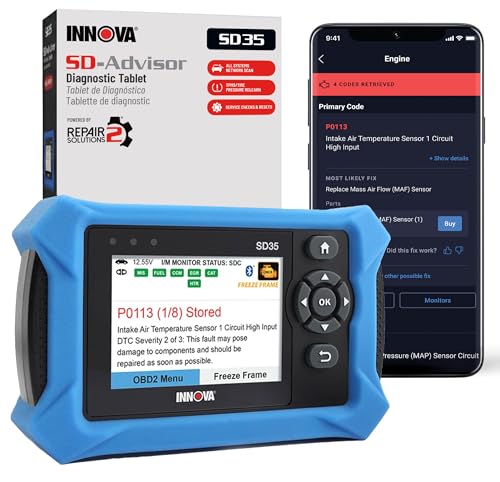
- Built-in 3.5-inch diagnostic display
- Reads engine, ABS, SRS, and TPMS codes
- Repair guidance without subscription fees
Best For: Owners seeking simple diagnostics and repair guidance
Best Advanced Coverage
Autel MaxiCOM MK900BT Bidirectional Scanner

- 8-inch tablet with wireless V150 connector
- 40-plus services and 3,000-plus active tests
- Supports CAN FD, DoIP, and full-system scans
Best For: Advanced DIYers and small shops needing broad coverage
Best Everyday DIY Pick

- Four-system diagnostics with live data
- 10 maintenance and reset functions
- 5.45-inch touchscreen with lifetime updates
Best For: DIYers handling routine diagnostics and maintenance
Advanced Wireless Value
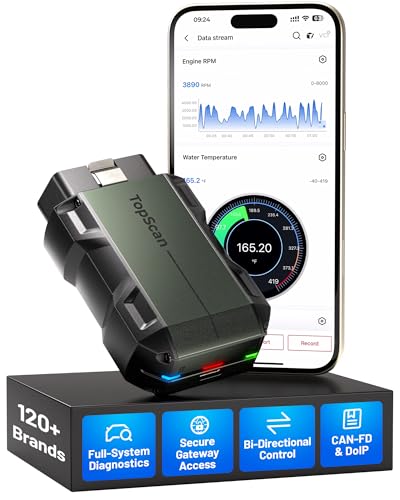
- Full-system scans and bidirectional controls
- 30+ maintenance functions and broad brand coverage
- TopFix AI, CAN-FD, DoIP, and one year of updates
Best For: Phone-based diagnostics for DIYers and technicians
Simple Handheld Choice

- Diagnoses ABS, SRS, engine, and transmission systems
- Includes full OBD2 functions and I/M readiness
- Plug-and-play design with free updates and a case
Best For: Basic warning-light checks and emissions preparation
Shop-Level Feature Value

- Topology mapping for faster network troubleshooting
- Up to 4000+ active tests and 42+ maintenance functions
- AI diagnosis, ECU coding, PMI, and broad coverage
Best For: Mechanics and advanced DIYers handling complex module faults
Best Budget Full-System Scanner

- Full-system diagnostics with AutoVIN and live data
- 15 reset and relearn functions
- Lifetime free updates, FCA AutoAuth, and CAN FD
Best For: DIYers seeking affordable full-system vehicle diagnostics
Best Budget Active-Test Scanner

- Bidirectional control for components and systems
- 12 reset functions for common maintenance tasks
- AutoVIN, live data, reports, and lifetime free updates
Best For: DIYers and small shops wanting straightforward active testing
Best Value Bidirectional Scanner – XTOOL A30D Full-Systems OBD2 Scanner
For shoppers comparing budget diagnostic tablets, the XTOOL A30D offers a strong mix of full-system scanning, bidirectional testing, and maintenance functions without subscription fees for its included lifetime software updates. It connects wirelessly to compatible Android and iOS devices and supports vehicles from 1996 onward, though functions vary by vehicle.
Best For: DIYers and home-garage users who want active tests and service resets from a phone-based diagnostic tool.
Pros:
- Bidirectional controls can test components such as fuel pumps, valves, wipers, windows, and lights.
- Includes 19 maintenance and relearn functions, including EPB, TPMS, ABS bleeding, oil, SAS, and BMS resets.
- Provides all-system diagnostics, live data, data logging, CAN-FD support, and FCA AutoAuth support.
- Free lifetime software updates are included without additional subscription charges.
Cons:
- Compatibility and available functions should be confirmed by VIN and vehicle year.
- Requires a compatible Android or iOS device rather than operating as a standalone tablet.
The A30D stands out among budget diagnostic tablets when two-way component testing matters. Its wireless, phone-based design keeps the cost practical while still offering capabilities beyond a basic code reader.
Best User-Friendly Tablet – Innova SD35 All-System OBD2 Scanner
The Innova SD35 is a practical choice for shoppers comparing budget diagnostic tablets with a built-in display. It reads engine, ABS, SRS, and TPMS codes, shows live data, tests the battery and alternator, and adds repair guidance through the RepairSolutions2 app without extra subscription fees.
Best For: Vehicle owners who want a straightforward tablet-style scanner with common system coverage and repair information.
Pros:
- Reads and clears check-engine, ABS, SRS, and TPMS codes.
- Displays live data such as RPM, fuel trims, temperatures, and oxygen-sensor performance.
- Includes TPMS checks, oil reset, battery and alternator testing, and a high-resolution 3.5-inch display.
- RepairSolutions2 provides verified fixes, suggested parts, and cost estimates without hidden subscriptions.
Cons:
- Vehicle and feature coverage varies, so Innova’s Coverage Checker should be used before purchase.
- The corded design is less flexible than a wireless scanner.
The SD35 favors ease of use over advanced active testing. It is a sensible budget diagnostic tablet for routine warning-light checks and maintenance, especially for buyers who value guided repair information.
Best Advanced Coverage – Autel MaxiCOM MK900BT Bidirectional Scanner
The Autel MaxiCOM MK900BT is an advanced option in the budget diagnostic tablets category, with an 8-inch screen, wireless V150 connector, full-system diagnostics, and extensive active testing. Its feature set is aimed at serious DIYers and small shops, but buyers should account for vehicle compatibility and potential subscription considerations.
Best For: Experienced users who need broad vehicle coverage, wireless diagnostics, and extensive bidirectional testing.
Pros:
- Offers more than 40 service functions and 3,000-plus claimed active tests.
- Supports full-system diagnostics, pre- and post-scans, CAN FD, and DoIP.
- Includes an 8-inch display, Android 11, 64GB storage, 4GB memory, and a 7,700mAh battery.
- Wireless diagnostics can work from up to 33 feet around the vehicle.
Cons:
- Its advanced feature set may be more than casual car owners need.
- Compatibility should be confirmed by VIN, and subscription renewals may apply after included coverage.
- The supplied listing contains extensive feature claims, so exact functions should be verified for the target vehicle.
The MK900BT is the most capable and tablet-like tool in this group. It makes sense when active tests, newer protocols, and a larger screen justify moving beyond entry-level budget diagnostic tablets.
Best Everyday DIY Pick – XTOOL D5 OBD2 Scanner
The XTOOL D5 is a balanced choice among budget diagnostic tablets for everyday warning-light checks and maintenance work. Its 5.45-inch touchscreen covers four major systems, includes 10 service functions, and offers lifetime free Wi-Fi updates, with coverage dependent on the vehicle.
Best For: First-time DIYers and weekend mechanics who want a dedicated touchscreen scanner for common repairs.
Pros:
- Provides Engine, Transmission, ABS, and SRS diagnostics plus standard OBD2 functions.
- Includes 10 service functions such as EPB, ABS bleeding, oil, TPMS, BMS, SAS, and injector coding.
- Offers AutoVIN, Auto Scan, live-data graphs, a DTC library, and diagnostic reports.
- Supports CAN FD, FCA AutoAuth, more than 90 vehicle brands, lifetime updates, and a two-year warranty.
Cons:
- Functions vary by make, model, year, and ECU; some vehicles may show only three systems.
- It does not offer the broader active-test range described for more advanced bidirectional tools.
The D5 keeps the feature set focused on common DIY diagnostics and service tasks. Its dedicated touchscreen and quick vehicle identification make it a practical middle ground for shoppers who want more than a code reader without stepping up to a professional tablet.
Advanced Wireless Value – TOPDON Topscan Master
For shoppers comparing budget diagnostic tablets and scanners, the TOPDON Topscan Master stands out for broad system coverage in a compact Bluetooth design. It supports full-system diagnostics, more than 30 service functions, bidirectional tests, and modern protocols including CAN-FD and DoIP.
Best For: DIYers and technicians who want advanced, phone-based diagnostics across many vehicle brands.
Pros:
- Full-system diagnostics with bidirectional component testing.
- More than 30 maintenance functions, including DPF, EPB, BMS, and TPMS resets.
- Supports 120+ brands, CAN-FD, DoIP, and FCA gateway access.
- Includes TopFix AI repair guidance and one year of updates.
Cons:
- Some gateway functions may require a valid OEM account.
- Ongoing updates require renewal after the included first year.
- Advanced functions vary by vehicle and module.
The Topscan Master offers unusually deep coverage for a portable scanner, especially if you value active tests and repair guidance. Confirm vehicle compatibility and account requirements before buying.
Simple Handheld Choice – OBDMATE OM901
If you want budget diagnostic tablets or a straightforward handheld alternative, the OBDMATE OM901 focuses on the most commonly serviced systems. Its 3.5-inch display handles ABS, SRS, engine, and transmission diagnostics without batteries, subscriptions, or complicated setup.
Best For: Car owners and DIY users who need affordable warning-light diagnosis and emissions-readiness checks.
Pros:
- Reads and clears ABS, SRS, engine, and transmission faults.
- Includes live data graphing, freeze frame, EVAP, O2, and I/M readiness functions.
- Plug-and-play operation with a protective case and carrying bag.
- Free updates and a three-year quality warranty.
Cons:
- Coverage is focused on four major systems rather than every vehicle module.
- It is corded and does not offer bidirectional controls.
- Advanced features and language options are more limited than higher-tier tools.
The OM901 is a practical low-cost pick for common diagnostic tasks and pre-smog preparation. Choose a more advanced scanner if you need active component tests or extensive full-system coverage.
Shop-Level Feature Value – XTOOL D8S AI Scanner
Among budget diagnostic tablets, the XTOOL D8S targets users who need deeper troubleshooting without moving straight to a premium-priced scanner. It combines topology mapping, AI-assisted diagnosis, bidirectional tests, ECU coding, and a large set of resets and active tests.
Best For: Independent mechanics and experienced DIYers working on complex vehicle networks and module-level repairs.
Pros:
- Topology mapping helps identify online, offline, and communication-related modules.
- Supports bidirectional active tests, AI-assisted fault analysis, and 8-PID live-data graphs.
- Offers 42+ maintenance functions, ECU coding, and selected PMI capabilities.
- Covers more than 150 brands and supports pre-scan and post-scan workflows.
Cons:
- Compatibility and advanced functions vary by vehicle, brand, and module.
- Topology mapping and AI features are not supported on every vehicle.
- Its broad feature set may be more than casual car owners need.
The D8S is the most feature-heavy option here for network diagnosis and shop workflows. Check the VIN compatibility details carefully, particularly for coding, PMI, and active-test functions.
Best Budget Full-System Scanner – XTOOL D6
If you want budget diagnostic tablets with more capability than a basic code reader, the XTOOL D6 is a practical step up. It provides full-system scanning, live data, AutoVIN, and 15 service functions, while lifetime free updates help keep ownership costs predictable. Vehicle coverage and functions vary, so confirm compatibility with your VIN before buying.
Best For: DIYers and home mechanics who want affordable full-system diagnostics and common relearn and reset functions.
Pros:
- Full-system scans cover modules such as ECM, TCM, ABS, SRS, HVAC, and BCM.
- Includes 15 service functions, including oil reset, EPB reset, BMS reset, TPMS relearn, and injector coding.
- Supports FCA AutoAuth, CAN FD, AutoVIN, live data, and lifetime free updates.
Cons:
- Functions vary by vehicle and are not available for every car.
- Live-data display is limited to four PIDs simultaneously.
The D6 is a strong value when you need broader system access and maintenance resets without moving to a more expensive professional tablet. Its compatibility check is especially important before purchase.
Best Budget Bidirectional Tablet – XTOOL D7
Among budget diagnostic tablets, the XTOOL D7 stands out for shoppers who want bidirectional testing and deeper service coverage. It combines full-system diagnostics with more than 4,000 active tests, 39-plus special functions, and support for FCA, CAN FD, and DoIP. It includes three years of updates and covers more than 100,000 vehicles, excluding Indian models.
Best For: Experienced DIYers, mobile technicians, and small repair shops that need active tests and advanced resets.
Pros:
- True bidirectional control supports tests for components such as fans, injectors, windows, A/C clutches, and ABS pumps.
- Offers 39-plus special functions, including module resets, relearns, calibrations, and adaptations.
- Displays up to eight live-data graphs and supports FCA, CAN FD, and DoIP protocols.
- Upgraded 64GB storage and a 5,000mAh battery support longer diagnostic sessions.
Cons:
- Its broader feature set may be more than casual users need.
- Updates are included for three years rather than lifetime.
- Vehicle coverage excludes Indian models.
The D7 is the most capable option here for troubleshooting components instead of only reading codes. Its bidirectional functions and extensive service menu make it a better fit for users who will regularly perform advanced diagnostics.
Best Budget Active-Test Scanner – THINKCAR THINKSCAN 662
The THINKCAR THINKSCAN 662 is one of the more accessible budget diagnostic tablets for users who want bidirectional control without stepping up to a higher-priced professional scanner. It handles ECM, TCM, ABS, and SRS diagnostics, includes 12 reset functions, and offers automatic VIN recognition, reports, and lifetime free updates.
Best For: DIY enthusiasts, road-rescue users, and smaller repair shops wanting an easy-to-use active-test scanner.
Pros:
- Bidirectional tests can operate components such as ABS systems, injectors, throttle controls, fans, pumps, and valves.
- Includes 12 practical reset functions, including BMS, brake, DPF, throttle, injector, oil, steering-angle, gearbox, and TPMS resets.
- Automatic VIN recognition, real-time data, waveform views, diagnostic history, and shareable reports simplify troubleshooting.
- Uses a 6.2-inch touchscreen with physical buttons, a 4,150mAh battery, and rubberized protection.
Cons:
- Its listed core diagnostics focus on ECM, TCM, ABS, and SRS rather than the broader system coverage of the XTOOL D7.
- Hardware includes 2GB RAM and 32GB storage, less than the D7.
The THINKSCAN 662 offers a useful balance of guided operation, active testing, and maintenance resets. Choose it when ease of use and lifetime updates matter more than the D7’s larger active-test library and broader protocol support.
How We Picked the Best Budget Diagnostic Tablets
We focused on diagnostic tablets and scan tools that offer meaningful coverage beyond basic OBD2 emissions codes. Our comparison considers supported vehicle systems, bidirectional or active-test capability, service resets, live data, update policies, connectivity, display usability, and the practical value of each feature set.
Because compatibility varies by vehicle year, region, engine, and trim, treat advertised functions as a starting point rather than a guarantee. Always confirm coverage for your specific make and model before buying, especially if you need ECU coding, topology mapping, advanced resets, or module programming.
Quick Comparison
- Best for broad DIY coverage: Choose a full-system tablet with ABS, SRS, transmission, and live-data support.
- Best for active testing: Look for bidirectional controls that can command components such as relays, motors, solenoids, or windows.
- Best for service work: Prioritize oil, battery, electronic parking brake, steering-angle, DPF, throttle, and injector resets that match your vehicles.
- Best for portability: Bluetooth tools and compact readers are easier to store and use, but may rely on a phone or offer less on-device guidance.
- Best for long-term value: Compare included update length, renewal costs, supported brands, and whether new functions require a subscription.
Key Buying Factors for Budget Diagnostic Tablets
Vehicle and System Coverage
Confirm that the scanner supports your vehicle’s manufacturer protocols and the systems you need to access. “Full system” generally means more than engine diagnostics, but coverage can still differ substantially between brands and models.
Bidirectional Testing and Coding
Bidirectional capability lets a tool send commands to selected modules, making it useful for troubleshooting rather than simply reading codes. Coding and adaptations are more advanced and may be limited to specific vehicles, so do not assume every tablet can perform them.
Screen, Software, and Connectivity
A built-in touchscreen is convenient for workshop use and displaying graphs, repair information, and topology maps. Bluetooth models can be flexible and affordable, while wired tablets usually avoid phone compatibility or connection issues.
Updates and Support
Check whether updates are free for a stated period, included for life, or renewed through a paid plan. Also consider technical support, report-sharing tools, battery life, storage, and the durability of the cable and connectors.
Who Should Buy Which Budget Diagnostic Tablets?
Occasional DIY owners should choose an affordable scanner with engine, ABS, and SRS access plus the specific resets they expect to use. Enthusiasts who diagnose intermittent faults should prioritize live-data graphs, active tests, and broad module coverage. Small repair shops may benefit from a faster tablet with topology mapping, ECU coding, extensive service functions, and dependable update support.
Before checkout, list your vehicles, required functions, and preferred connection type. The right budget diagnostic tablet is not necessarily the one with the longest feature list—it is the one that reliably supports the systems and procedures you actually need.
