

10 Best Car Diagnostic Tablets for DIY Mechanics in 2026

Choosing the right scan tool can make home repairs faster, safer, and far less frustrating. The best tablets do more than read codes—they help you test systems, run service functions, and narrow down problems with confidence.
This roundup focuses on car diagnostic tablets for DIY mechanics that balance capability, ease of use, and value in 2026.
Best 10 Car Diagnostic Tablets for DIY Mechanics Picks for 2026
Shop-Grade Wireless Pro
GEARWRENCH 10" Wireless Bi-Directional Diagnostic Tablet
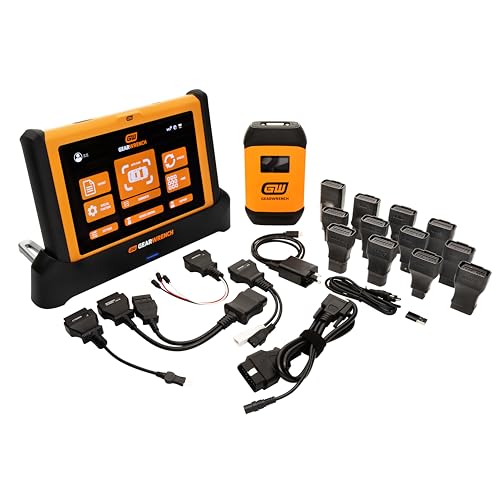
- 10-inch rugged Android tablet with wireless VCI
- 51+ reset and relearn functions for advanced service work
- Bidirectional control plus topology mapping and live data tools
Best For: Serious DIY mechanics wanting a rugged, shop-style wireless tablet
Wireless Value Scanner
TOPDON AD900 Lite OBD2 Scanner, Bidirectional Scan Tool, 8" Large Screen

- Bluetooth 5.0 wireless diagnostics up to 33 feet
- OE-level full-system scans with 8 reset services
- 8-inch Android 11 tablet with 12-hour battery
Best For: DIYers who want wireless diagnostics and broad maintenance functions
Advanced Protocol Specialist
Launch X-431 Elite PRO Diagnostic Tablet

- CANFD and DOIP support for late-model vehicles
- Bidirectional tests, topology mapping, and J2534 PassThru
- VW/Audi guided functions plus remote diagnostic support
Best For: Advanced DIY mechanics working on late-model VW, Audi, and other modern vehicles
Feature-Packed Bargain

- 3,000+ active tests across many brands and systems
- 28+ service functions for common DIY repairs
- Full-system diagnostics with live data and freeze-frame
Best For: DIYers who want a high-value wired tablet with broad coverage and service functions
Launch Premium Flagship

- ECU backup/restore and ECU/SCN coding
- 60+ service functions with topology mapping
- Supports J2534, Do-IP, and CAN FD
Best For: Advanced DIYers needing high-end coding and diagnostic depth
Wireless Midrange Choice
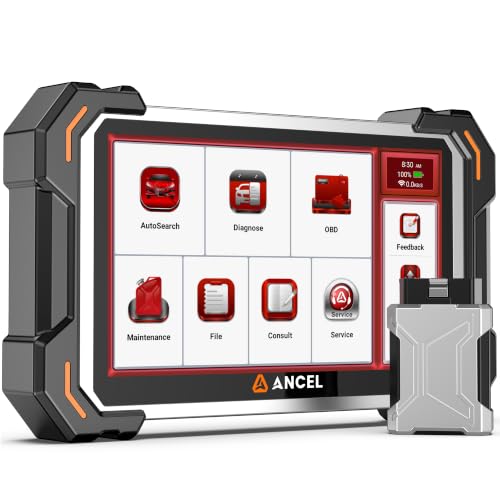
- 3000+ bidirectional active tests
- 28+ service functions for common repairs
- Wireless diagnostics with reports and screenshots
Best For: DIYers wanting active tests and wireless shop-style convenience
Feature-Rich Upgrade

- Full-system diagnostics with topology mapping
- 55+ reset and adaptation functions
- Supports CAN FD, DoIP, and FCA AutoAuth
Best For: DIY mechanics wanting broad coverage and advanced service resets
Advanced Wireless Pick
THINKCAR 689BT Bidirectional OBD2 Scanner

- 3000+ active tests and bidirectional control
- ECU coding plus 34+ service functions
- 8-inch Android 10 touchscreen with Bluetooth 5.0
Best For: DIYers who want advanced testing and coding in a wireless tablet scanner
Best-Value Wireless Scanner
LAUNCH X431 CRP919XBT Bidirectional Scanner

- Wireless DBSCar VII VCI with CAN-FD, DoIP, and FCA AutoAuth
- ECU coding and 35+ reset services
- Bidirectional tests with AutoVIN and AutoScan
Best For: DIY mechanics who want a capable wireless scanner with broad vehicle support
Shop-Grade Wireless Pro – GEARWRENCH 10" Wireless Bi-Directional Diagnostic Tablet
If you want car diagnostic tablets for DIY mechanics that feel closer to a professional shop tool, the GEARWRENCH GWSMART10 is built for that role. It combines a 10-inch Android tablet, wireless VCI, bidirectional control, and 51+ reset/relearn functions, so you can test systems, command modules, and handle more advanced service work without being tethered by cables.
Best For: Serious DIY mechanics and home-shop users who want a rugged, full-size diagnostic tablet with broad reset coverage and wireless operation.
Pros:
- Bidirectional control for real-time component activation and system tests.
- 51+ reset and relearn functions, including ABS bleed, steering angle calibration, injector coding, battery resets, throttle matching, transmission adaptations, and TPMS reset.
- Topology mapping, live data graphing, data stream comparison, and freeze-frame analysis for faster troubleshooting.
- Fast 5GHz Wi-Fi and high-speed wireless VCI help keep the workflow uncluttered.
Cons:
- The software plan is free for 3 years, then costs $150 per year after that.
- It is positioned as a premium, full-time shop-use tablet, so it may be more tool than a casual DIYer needs.
This is the kind of scanner that makes sense if you regularly work on modern vehicles and want shop-style diagnostics at home. Its strength is depth: broad service functions, strong data analysis, and wireless convenience in one rugged package.
Wireless Value Scanner – TOPDON AD900 Lite OBD2 Scanner, Bidirectional Scan Tool, 8" Large Screen
The TOPDON AD900 Lite is a practical pick for DIY mechanics who want a capable wireless diagnostic tablet without jumping straight to top-tier shop pricing. It brings an 8-inch touchscreen, Android 11, Bluetooth 5.0 wireless diagnosis, bidirectional control, and OE-level full-system coverage, making it a strong all-around tool for troubleshooting and maintenance.
Best For: DIY enthusiasts and small-shop users who want wireless bidirectional diagnostics, service resets, and broad system coverage.
Pros:
- Bidirectional testing can command components like injectors, coolant pumps, windows, wipers, headlights, and mirrors.
- OE-level full-system diagnostics across modules such as engine, transmission, airbag, ABS, TPMS, gateway, and more.
- 8 hot reset services including oil reset, throttle adaptation, EPB, steering angle, DPF regeneration, ABS bleeding, BMS, and airbag resets.
- Bluetooth 5.0 VCI supports wireless diagnosis up to 33 feet, with a 10000mAh battery rated for up to 12 hours.
Cons:
- Battery testing is listed as optional, not a guaranteed included function.
- The DTC repair guide is highlighted for Chrysler/Dodge/Jeep/Fiat 2010-2014, so some guidance is vehicle-specific.
Overall, this scanner balances features and convenience well for home garages. It offers enough depth for real diagnostic work while staying approachable for DIY use, especially if wireless operation matters.
Advanced Protocol Specialist – Launch X-431 Elite PRO Diagnostic Tablet
For car diagnostic tablets for DIY mechanics who work on newer vehicles, the Launch X-431 Elite PRO stands out for its protocol support and guided functions. It pairs a 10.1-inch Android tablet with CANFD and DOIP compatibility, bidirectional active tests, topology mapping, and SmartLinkC J2534 PassThru support, giving you a more OEM-oriented diagnostic workflow.
Best For: Advanced DIY mechanics and enthusiasts working on late-model vehicles, especially VW and Audi.
Pros:
- Supports CANFD and DOIP for late-model vehicle coverage.
- Bidirectional active tests and topology mapping help confirm repairs and visualize module status.
- SmartLinkC V2.0 PassThru lets you run OEM diagnostic software via J2534 protocols.
- VW/Audi guided functions, plus Code Assist by Identifix and Tech-to-Tech remote diagnosis, add useful support.
Cons:
- It is aimed at more advanced users, so casual DIYers may not use its full depth.
- Included free software updates are only for 1 year.
This is a strong choice if your garage sees modern cars and you want more than basic code reading. The combination of protocol support, guided diagnostics, and remote help makes it especially useful for complex jobs.
Feature-Packed Bargain – Autel Scanner MaxiCOM MK808S
The Autel MaxiCOM MK808S is a strong pick for DIY mechanics who want car diagnostic tablets with wide coverage and a lot of service capability for the money. It offers full-system diagnostics, bidirectional active tests, 28+ service functions, and support for more than 200 brands, making it a versatile wired scanner for home garage repairs and faster fault isolation.
Best For: DIYers who want broad vehicle coverage, lots of service functions, and strong active-test capability without paying flagship prices.
Pros:
- 3,000+ active tests let you command actuators across many systems and brands.
- 28+ hot service functions include oil reset, BMS, SAS, injector, clutch learn, cylinder balance, suspension calibration, and sunroof initialization.
- Full-system diagnostics with live data and freeze-frame support help move beyond simple code reading.
- Covers 200+ universal brands, with SGW access and support for newer FCA, Renault, and VAG models.
Cons:
- It uses a wired connection, so it does not offer the wireless convenience of some competing tablets.
- Vehicle-specific function availability still depends on compatibility.
For the DIY mechanic who values capability over flash, the MK808S is a practical workhorse. It delivers deep diagnostics and a broad service menu in a format that aims to keep cost down while keeping coverage high.
Launch Premium Flagship – Launch X431 PAD VII Elite
If you want a high-end option among car diagnostic tablets for DIY mechanics, the Launch X431 PAD VII Elite is built for deep diagnostic work rather than basic code reading. It combines bidirectional testing, ECU backup/restore, ECU/SCN coding, topology mapping, and 60+ service functions, so it suits projects where you want broad coverage and advanced system-level control.
Best For: Serious DIY mechanics and advanced users who want near-shop-level diagnostic depth, coding, and expandability.
Pros:
- ECU backup/restore plus ECU/SCN coding for advanced repair and programming tasks
- 60+ service functions with topology mapping and actuation tests
- Supports J2534, Do-IP, and CAN FD for modern vehicle protocols
- Add-on support for modules like oscilloscope, battery test, endoscope, and more
Cons:
- Some online features may require activation steps and VPN access per the listing notes
- Advanced capability likely exceeds what casual DIY users need
- Accessory modules are sold separately
This is the most feature-packed tool in the group, and the tradeoff is that it is clearly aimed at users who will actually use its advanced functions. If your projects go beyond routine maintenance, it offers a lot of headroom.
Wireless Midrange Choice – ANCEL DS500BT
The ANCEL DS500BT is a practical pick if you want car diagnostic tablets for DIY mechanics that focus on active testing and everyday repair workflows. It scans major systems, offers 3000+ bidirectional active tests, and includes 28+ service functions, making it a strong balance of capability and usability for supported 12V vehicles.
Best For: DIY mechanics who want wireless diagnostics, active tests, and useful reset functions without stepping into ultra-premium territory.
Pros:
- 3000+ bidirectional active tests to help confirm component faults before replacing parts
- 28+ service functions including ABS bleeding, DPF regen, injector coding, and throttle relearn
- Wireless diagnostics, AutoVIN, and a rear stand for easier garage use
- Lifetime free software updates plus report and screenshot capture for records
Cons:
- Designed for supported 12V vehicles only and not compatible with 24V heavy-duty vehicles
- Coverage should be checked before ordering
- FCA SGW access is limited to select Chrysler, Dodge, Jeep, and Ram models
For home mechanics who want to move beyond basic code readers, this model offers a very usable set of service tools and active tests. Its wireless workflow and reporting features make it especially handy for real repair sessions.
Feature-Rich Upgrade – Launch X431 PRO3S+ V5.0
Among car diagnostic tablets for DIY mechanics, the Launch X431 PRO3S+ V5.0 stands out as a full-system scanner with a strong mix of coding, service resets, and broad vehicle coverage. It supports bidirectional testing, topology mapping, 55+ reset services, and modern protocols like CAN FD and DoIP, so it is well suited to more ambitious home repair work.
Best For: DIY mechanics who want wide vehicle coverage, advanced service functions, and coding features in a tablet-style scanner.
Pros:
- Full-system diagnostics with live data, active tests, and topology mapping
- 55+ reset and adaptation functions, including ABS bleeding, TPMS, DPF, and BMS
- Supports FCA AutoAuth, CAN FD, DoIP, and HD module compatibility
- 10.1-inch Android tablet hardware with dual-band WiFi and long battery life
Cons:
- HD truck and ADAS expansion require compatible modules or upgrades
- Advanced functions may be more than a basic DIY user needs
- Some OE-level features vary by vehicle brand and model
This model is a strong middle-ground pick if you want serious diagnostic reach without jumping all the way to a top flagship. It has the breadth to handle many modern vehicles while still keeping the workflow approachable for home use.
Advanced Wireless Pick – THINKCAR 689BT Bidirectional OBD2 Scanner
If you want one of the most capable car diagnostic tablets for DIY mechanics, the THINKCAR 689BT is built for deeper troubleshooting rather than basic code reading. It combines full-system diagnostics with 3000+ active tests, ECU coding, and 34+ reset services, so it’s aimed at owners who want to test parts, perform maintenance, and handle more advanced jobs from a tablet-style interface.
Best For: DIY mechanics who want a powerful, wireless scan tool with advanced active tests and ECU coding.
Pros:
- 3000+ active tests for bidirectional control of components like injectors, relays, and cooling fans
- ECU coding support for module matching and hidden feature activation
- 34+ reset and maintenance functions for common service tasks
- 8-inch HD touchscreen with Android 10 and wireless Bluetooth 5.0 operation
Cons:
- Sold as a corded-electric tablet style tool, so it is not a standalone handheld for every situation
- One note mentions used customer-return units may occasionally be resold by Amazon
- Advanced features may be more than casual code readers need
Overall, the 689BT stands out if you want a feature-heavy diagnostic tablet that goes well beyond clearing check-engine lights. Its combination of active tests, ECU coding, and broad system coverage makes it a strong fit for serious DIY repair work.
Best-Value Wireless Scanner – LAUNCH X431 CRP919XBT Bidirectional Scanner
For car diagnostic tablets for DIY mechanics, the LAUNCH X431 CRP919XBT is positioned as a high-value wireless option with broad coverage and modern protocol support. It adds bidirectional control, ECU coding, AutoVIN/AutoScan, and 35+ reset services, making it a practical choice for people who want more than a basic OBD2 reader without jumping to a full shop machine.
Best For: DIY mechanics who want a cost-effective wireless scanner with strong brand coverage and advanced service features.
Pros:
- Wireless DBSCar VII VCI with support for CAN-FD, DoIP, and FCA AutoAuth
- ECU coding plus 35+ reset services and hidden-function changes
- Bidirectional control for testing components like fans, windows, mirrors, and injectors
- AutoVIN and AutoScan help speed up full-system diagnostics
Cons:
- Feature set is broad, so first-time users may need time to learn the workflow
- The notes are heavily marketing-focused, so buyers should compare exact vehicle support carefully
- Wireless operation depends on the included VCI and updated software
The CRP919XBT looks like a smart middle ground if you want a tablet-style diagnostic tool with modern protocol compatibility and useful repair functions. It is especially appealing for DIY users who value wireless convenience and frequent software updates.
Top-Tier Feature Set – LAUNCH X431 PRO V5.0 Wireless Bidirectional Scanner
The LAUNCH X431 PRO V5.0 is a strong option if you’re shopping for car diagnostic tablets for DIY mechanics and want a proven full-system tool with deeper service capability. It combines 4000+ active tests, 38+ special functions, bidirectional control, and broad brand coverage, giving home mechanics a tablet-based scanner that can handle both routine maintenance and more involved diagnostics.
Best For: DIY mechanics and enthusiasts who want a highly capable wireless scanner with extensive active tests and service functions.
Pros:
- 4000+ active tests and bidirectional functions for component testing
- 38+ special functions plus adaptation, initialization, and matching
- Supports Smartlink HD for 24V applications
- 8-inch Android tablet hardware with dual WiFi and 2 years of updates
Cons:
- Higher-end feature set may be more than occasional DIY users need
- Many functions are accessed under brand and system menus, so setup can take time
- Premium capabilities usually come with a steeper learning curve
In practice, the PRO V5.0 is the most ambitious of the three for users who want broad coverage and a large feature set in one tool. If you’re serious about DIY diagnostics and want room to grow into more advanced repairs, this model has a lot to offer.
How We Picked the Best Car Diagnostic Tablets for DIY Mechanics
We prioritized Car Diagnostic Tablets for DIY Mechanics that offer broad vehicle coverage, bidirectional control, useful service resets, and a clear interface. We also looked for practical details that matter in a garage, including wireless connectivity, update support, screen size, and whether the tool is easy to move between vehicles.
Quick Comparison
For basic home maintenance, entry-level all-system tablets can cover code reading, live data, and common resets. Midrange options add bidirectional tests and more service functions for deeper troubleshooting. High-end models are better suited for advanced coding, topology views, secure gateway access, and programming tasks.
Key Buying Factors for Car Diagnostic Tablets for DIY Mechanics
Vehicle Coverage
Make sure the tablet supports the makes and model years you actually service. Broad OBD2 compatibility is helpful, but brand-specific functions, special resets, and guided procedures can be the difference between a useful tool and an expensive basic scanner.
Bidirectional Controls
Bidirectional capability lets you command components like fans, relays, windows, or injectors during diagnosis. For DIY mechanics, this is one of the most valuable upgrades because it helps confirm whether the fault is in the part, wiring, or control system.
Service and Maintenance Functions
Look for oil reset, EPB, battery registration, steering angle calibration, throttle relearn, and ABS bleeding if you handle routine repairs. The more service functions included, the more jobs you can complete without a shop visit.
Software, Updates, and Ease of Use
A clean menu layout, fast boot times, and reliable software updates matter more than flashy specs. Wireless connectivity is convenient, but stable app performance and ongoing coverage updates matter most over time.
Who Should Buy Which Car Diagnostic Tablets for DIY Mechanics?
If you want a straightforward tool for code reading and common maintenance, choose a simpler tablet with solid all-system coverage. If you routinely diagnose intermittent faults or perform more involved repairs, step up to a model with stronger bidirectional testing and broader service support. For advanced home garages, European vehicles, or users considering programming and coding, premium tablets offer the most flexibility and long-term value.
In short, the best choice depends on how deep you plan to go. Match the tablet to your vehicles, your repair experience, and the jobs you want to do yourself.
