

10 Best Diagnostic Scanners for BMW X3 in 2026: Find the Right Tool for Repairs and Maintenance

A check-engine light is only one reason to scan a BMW X3. Battery replacement, brake work, and faults in systems beyond the engine may call for functions a basic OBD2 reader cannot provide.
These 10 listings cover handheld BMW-focused scanners and a Bluetooth adapter. The right choice depends on your X3’s model year, the systems you need to access, and whether you prefer a standalone tool or a phone app.
Best 10 Diagnostic Scanner for Bmw X3 Picks for 2026
Most Advanced Standalone Tool

- Full-system BMW diagnostics and live data
- Bi-directional component tests
- ECU coding and maintenance functions
Best For: Hands-on X3 troubleshooting and supported coding
Best Guided Battery Registration

- Auto VIN and full-system scans
- Guided compatible-battery registration
- 20-plus advertised service functions
Best For: Offline DIY maintenance and battery replacement
Best Phone-Based Coding Adapter

- Designed for BimmerCode compatibility
- Works with iOS and Android
- Included app provides basic diagnostics
Best For: App-based X3 coding and basic checks
Best for Essential Service Tasks

- Full-system fault checks
- Compatible-battery registration
- Lifetime software updates included
Best For: Routine X3 diagnostics and service resets
Best Plug-and-Play Pick
- Automatic VIN detection
- BMW-family full-system scans
- Battery registration and service resets
Best For: Standalone BMW X3 maintenance checks
Most Flexible Connection

- Handheld and Bluetooth app modes
- 70+ supported BMW modules
- Battery registration; no capacity coding
Best For: Owners wanting standalone and phone-based checks
Pre-2023 BMW Specialist

- BMW-family diagnostics before 2023
- Battery registration and service functions
- Standard OBD2 data and readiness checks
Best For: Pre-2023 X3 owners seeking a wired handheld tool
Budget BMW Basics

- Major-system codes and live data
- Oil reset and supported battery registration
- Lifetime free USB updates
Best For: Straightforward X3 diagnostics and routine upkeep
Expanded-Storage Pick
LAUNCH Creader Elite V3.0 (64GB Listing)

- Full-system scans and active tests
- Battery registration and service functions
- 64GB storage listed; lifetime updates
Best For: X3 owners seeking active tests and supported coding
Hands-On Testing Pick
LAUNCH Creader Elite V3.0 (32GB Listing)

- Full-system fault scans and live data
- Bidirectional component tests
- 32GB storage listed; lifetime updates
Best For: X3 troubleshooting with supported active tests
Most Advanced Standalone Tool – LAUNCH Creader Elite X500
If you want a diagnostic scanner for BMW X3 models that goes beyond reading codes, the LAUNCH Creader Elite X500 combines full-system scans with active tests, ECU coding, and maintenance functions. Its touchscreen makes it a standalone option for owners who handle more involved troubleshooting themselves.
Best For: X3 owners and independent mechanics who need active testing and supported coding functions.
Pros:
- Reads and clears faults across BMW systems, with live-data graphs and Auto VIN.
- Bi-directional tests can command components such as fans and fuel pumps.
- Includes ECU coding and service functions such as battery registration and ABS bleeding.
Cons:
- Its extensive feature set may be more than you need for basic check-engine diagnostics.
- Confirm the specific coding and active tests available for your X3 before buying.
Choose this one when identifying a faulty component or completing supported repairs matters more than keeping the tool simple.
Best Guided Battery Registration – ANCEL BM700 PRO
The ANCEL BM700 PRO is a diagnostic scanner for BMW X3 owners who want a wired, standalone tool for full-system fault checks and routine service tasks. Auto VIN simplifies vehicle selection, while guided battery registration is particularly useful after a compatible replacement.
Best For: DIY owners who prioritize straightforward scans, battery registration, and maintenance resets.
Pros:
- Auto VIN and full-system scans help streamline BMW diagnostics.
- Offers guided registration for supported same-type, same-capacity AGM/EFB batteries.
- Includes 20-plus advertised service functions without subscription fees.
Cons:
- BMW-specific functions vary by model; verify your X3’s supported features.
- Battery registration is specified for same-type, same-capacity replacements.
Its appeal is getting common ownership tasks done without a phone or network connection, provided its vehicle-specific coverage matches your needs.
Best Phone-Based Coding Adapter – OBDLink CX
If your search for a diagnostic scanner for BMW X3 is really about using BimmerCode, the OBDLink CX takes a different approach: it is a Bluetooth adapter for your iPhone or Android device, not a standalone scan tool. The included OBDLink app handles basic diagnostics and live parameters, while BimmerCode supports compatible coding features.
Best For: X3 owners who want phone-based diagnostics and plan to use the separate BimmerCode app.
Pros:
- Recommended by the BimmerCode team for its supported vehicles and features.
- Pairs with iOS and Android devices.
- Included OBDLink app can display live parameters and clear check-engine lights.
Cons:
- BimmerCode is sold separately.
- Confirm your X3 and desired coding options in the BimmerCode app before purchasing.
Pick the CX for a compact, app-driven setup; look to a dedicated BMW scanner if you prefer an all-in-one handheld device.
Best for Essential Service Tasks – AUTOPHIX 5900
The AUTOPHIX 5900 is a diagnostic scanner for BMW X3 owners focused on locating faults and completing common post-service steps. It reads and clears codes across supported vehicle systems, registers compatible replacement batteries, and provides oil, CBS, and electronic parking-brake functions where available.
Best For: Owners who need BMW system checks, compatible-battery registration, and maintenance reminders handled at home.
Pros:
- Checks systems including engine, transmission, ABS, and SRS.
- Supports battery registration plus applicable oil and CBS resets.
- Includes lifetime software updates without subscription fees.
Cons:
- Battery registration is limited to same-type, same-capacity replacements; battery coding is not supported.
- Service functions vary by model and year.
This is a practical choice when routine BMW maintenance is the goal, but check your X3’s supported functions before relying on it for a particular repair.
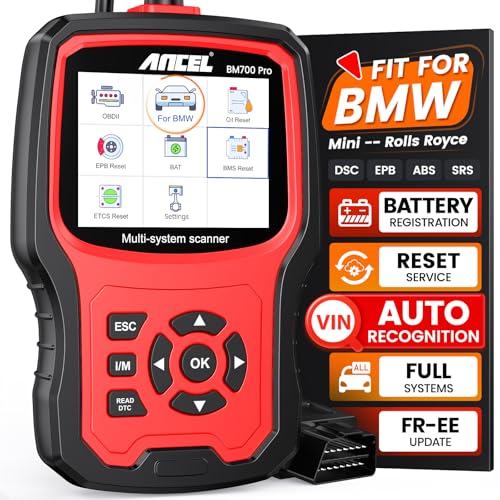
Best Plug-and-Play Pick – ANCEL BM700 PRO
If you want a diagnostic scanner for BMW X3 maintenance without pairing a phone, the ANCEL BM700 PRO is a wired option with automatic VIN detection and BMW-family full-system scanning. It also includes battery registration and a range of service functions.
Best For: BMW X3 owners who prefer a standalone scanner for fault checks and routine service tasks.
Pros:
- Auto VIN detection reduces manual vehicle selection.
- Reads faults across supported systems, including engine, transmission, ABS, and airbags.
- Offers battery registration, oil and TPMS resets, ABS bleeding, and other listed services.
- Includes live-data graphs and a one-button I/M readiness screen.
Cons:
- Wired, 2.8-inch-screen design may not suit buyers who want phone-based diagnostics.
- Vehicle-specific service availability should be checked before buying.
The BM700 PRO makes the most sense when quick setup and broad BMW-focused maintenance functions matter more than app connectivity. Confirm the functions you need for your X3’s year and configuration.
Most Flexible Connection – ANCEL BD330
The ANCEL BD330 is a diagnostic scanner for BMW X3 owners who want a handheld reader plus Bluetooth app features. It pairs BMW-family system scans and supported service functions with an app dashboard and HUD mode for selected driving data.
Best For: Drivers who want both phone-free garage checks and app-based monitoring.
Pros:
- Works as a standalone handheld scanner or with the ANCEL Bluetooth app.
- Accesses more than 70 supported BMW modules for fault checks and live data.
- Offers supported battery registration, CBS, EPB, and throttle resets.
- Includes lifetime free software updates without an annual subscription fee.
Cons:
- Battery registration does not include custom battery-capacity coding.
- Module and service coverage varies by model, year, and ECU; app use requires phone permissions.
Choose the BD330 if its mix of wired scanning and app tools fits your workflow. Check your X3’s specific coverage, especially for battery replacement or reset functions.
Pre-2023 BMW Specialist – SAZDOLN Z100
For a BMW X3 built before 2023, the SAZDOLN Z100 is a diagnostic scanner for BMW X3 owners seeking a portable, wired tool for full-system fault checks and maintenance functions. Its BMW-family diagnostics are specifically limited to eligible pre-2023 vehicles.
Best For: Owners of pre-2023 BMW X3 models who want handheld diagnostics and common service resets.
Pros:
- Scans supported BMW-family body, chassis, powertrain, and other systems.
- Lists battery registration, ABS bleeding, oil reset, EPB reset, and other maintenance functions.
- Includes standard OBD2 checks such as codes, I/M status, freeze frames, and live data.
Cons:
- BMW-family diagnostics are not specified for 2023 or newer models.
- BMW-specific diagnostic functions are not intended for other makes.
The Z100 is worth considering for an older X3 when its listed service functions match your jobs. Verify compatibility with your exact model year before relying on it for a repair.
Budget BMW Basics – Creator C420 Code Reader
If you need a diagnostic scanner for BMW X3 maintenance without stepping up to a more advanced tool, the Creator C420 covers fault codes across major systems, live data, oil resets, and supported battery registration.
Best For: X3 owners who want straightforward BMW-focused diagnostics and routine service functions.
Pros:
- Reads and clears codes in major systems, including engine, transmission, ABS, and SRS.
- Provides live data, graph display, oil reset, and other supported service functions.
- Has a 2.4-inch color screen and lifetime free software updates via USB.
Cons:
- Battery registration does not support the E83 X3; the manufacturer notes that this chassis does not require it.
- Some 1997–2004 BMWs may need a separately purchased 20-pin adapter.
The C420 makes sense when fault finding and basic upkeep matter more than advanced controls. Check the functions available for your X3’s model year before buying.
For shoppers seeking a more capable diagnostic scanner for BMW X3 models, this LAUNCH Creader Elite V3.0 listing combines full-system scans with active tests, service functions, and vehicle-setting customization. Its supplied notes specify 64GB of storage.
Best For: Owners who want to investigate faults and perform supported maintenance and coding tasks on their X3.
Pros:
- Scans available modules and provides codes, live data, freeze-frame information, and Auto VIN scanning.
- Supports bidirectional active tests of components such as windows, mirrors, wipers, and the horn.
- Lists battery registration for both matching and different battery types or capacities, subject to compatibility.
- Includes lifetime free updates and lists 64GB of storage.
Cons:
- DoIP support for certain post-2018 BMW chassis requires an adapter.
- Available coding and service functions vary by vehicle; confirm compatibility for your X3.
This is a stronger fit than a basic code reader if you will use active tests or supported coding. Verify your exact chassis and desired functions before purchasing.
If you want a diagnostic scanner for BMW X3 troubleshooting that goes beyond reading codes, this LAUNCH Creader Elite V3.0 listing offers full-system diagnostics, component active tests, and supported maintenance functions. Its supplied notes specify 32GB of storage.
Best For: X3 owners who want hands-on component testing alongside diagnostic and service features.
Pros:
- Reads and clears codes across available modules and displays live data and freeze-frame information.
- Offers bidirectional tests for supported components, including windows, mirrors, wipers, and horn.
- Lists oil reset, ABS bleeding, EPB service, and battery registration among its service functions.
Cons:
- DoIP use on certain post-2018 BMW chassis requires an adapter.
- Feature availability, including coding, depends on the vehicle.
Choose this listing for the active-testing and service-tool feature set, not an assumed guarantee of every function on every X3. Confirm coverage for your model before ordering.
How We Picked the Best Diagnostic Scanner for Bmw X3
We focused on practical differences in the listed products: full-system diagnostics versus basic OBD2 functions, advertised service features, battery registration, and standalone versus app-based operation. We also considered whether a tool is aimed at BMW-family vehicles rather than generic engine-code reading. The supplied list includes repeated ANCEL BM700 PRO and LAUNCH Creader Elite V3.0 listings; check the exact version and seller offer instead of treating repeated entries as different capabilities.
Features and vehicle coverage can change by model year, software version, and equipment. Confirm the seller’s compatibility information for your X3 before buying, especially if you need one specific reset or repair function.
Quick Comparison
For a standalone, BMW-focused tool, compare the LAUNCH Creader Elite X500 and V3.0, ANCEL BM700 PRO and BD330, AUTOPHIX 5900, Z100, and Creator C420 by their confirmed X3 coverage. These listings emphasize different combinations of system scanning and maintenance functions; a longer feature list is not proof that every function works on every X3.
The OBDLink CX is the outlier: it is a Bluetooth adapter for use with compatible phone apps, not a handheld scanner with its own screen. Consider it if app-based diagnostics or coding is your priority, and account for any app requirements or fees.
Key Buying Factors for a Diagnostic Scanner for Bmw X3
Match Your Exact X3
Check the model year, generation, engine, and relevant equipment against the manufacturer’s coverage details. “Works with BMW” is too broad when you need access to a particular module or service procedure.
Choose the Functions You Will Actually Use
Generic OBD2 reading typically addresses emissions-related engine faults. If you need ABS, airbag, or other BMW system diagnostics, look for explicit module coverage. For maintenance, verify the exact task—such as oil-service reset, electronic parking brake service, ABS bleeding, or battery registration—rather than relying on an “all resets” label.
Check Battery and Coding Requirements
After a battery replacement, a BMW X3 may require registration, and changing battery type or capacity can introduce a separate coding requirement. Make sure the tool supports the procedure your job calls for. Likewise, an adapter advertised for coding needs a compatible app; diagnostic access and coding are not interchangeable.
Consider Ownership Costs
Compare update policies, subscription or app costs, connection method, and ease of use. A self-contained scanner is convenient in the garage; a phone adapter is compact but depends on your device and software.
Who Should Buy Which Diagnostic Scanner for Bmw X3?
For routine DIY maintenance, start with a BMW-specific handheld scanner whose verified X3 coverage includes your likely resets and battery registration. For troubleshooting warnings outside the engine, prioritize confirmed full-system access and readable fault information. Choose the OBDLink CX if you specifically want a phone-based setup and have checked your preferred app’s X3 compatibility. If you only need to read a generic check-engine code, avoid paying extra for BMW service features you will not use.
