

10 Best Professional Heads-Up Car Displays for Safer Driving in 2026

A heads-up display can keep essential driving information in your line of sight, reducing the need to glance down at the dashboard. The best models project speed and alerts onto the windshield or a dedicated reflective screen.
These 10 professional heads-up car displays include OBD2 and GPS options, with features such as overspeed warnings, automatic brightness control, multi-color readouts, and support for MPH or KM/H.
Best 10 Professional Heads-Up Car Displays Picks for 2026
Best Dual-Mode Choice

- OBD2 and GPS operation
- Displays extensive vehicle data
- Dashboard or windshield mounting
Best For: Drivers wanting detailed metrics and flexible compatibility
Best Large-Screen OBD2 Display
- Large simultaneous data display
- Six safety alarm types
- Simple OBD2 plug-and-play setup
Best For: Compatible post-2008 gasoline vehicles
Best GPS Speed-Focused Pick

- GPS and BeiDou speed data
- Smooth 10Hz oversized display
- USB-C plug-and-play operation
Best For: Drivers wanting a simple speed-only HUD
Best Alert-Rich OBDII Option
- Displays broad vehicle information
- Includes multiple driving alerts
- Automatic vehicle-linked power
Best For: OBDII/EUOBD drivers wanting data and reminders
Most Versatile Dual-Mode Pick

- OBD and GPS operating modes
- Shows speed, voltage, temperature, and distance
- Automatic brightness with configurable units
Best For: Drivers seeking broad vehicle-data coverage and GPS fallback
Best USB Simplicity

- USB plug-and-play setup
- 10 Hz GPS+BDS signal refresh
- Large MPH display with auto brightness
Best For: USB-equipped vehicles needing a simple GPS speed display
Best Flat-Screen Design
M22 GPS Windshield Speedometer

- Shows speed, time, distance, and compass direction
- Overspeed alert with MPH/KM/H support
- Automatic vehicle-linked startup and shutdown
Best For: Drivers wanting a compact GPS display with travel details
Best OBD Data Display
- Large 5.5-inch HD screen
- Displays speed, temperature, voltage, and distance
- Supports selected fault alerts and readings
Best For: OBDII and EOBD vehicles needing detailed car data
Best Dual-Mode Choice – wiiyii P6 OBD2/GPS HUD
For drivers comparing professional heads-up car displays, the wiiyii P6 stands out for combining OBD2 and GPS data in one dashboard-mounted unit. It can show speed, RPM, voltage, fuel consumption, and water temperature, while its adjustable bracket supports dashboard or windshield placement.
Best For: Drivers who want broad vehicle data, flexible installation, and GPS fallback when OBD2 compatibility is unavailable.
Pros:
- Combines OBD2 and GPS modes for broader compatibility.
- Displays more than 100 types of vehicle data through the OBD system.
- Offers automatic brightness adjustment and a red overspeed warning light.
- Includes dashboard and windshield installation options.
Cons:
- The plastic unit is relatively large compared with a basic speed display.
- Some advanced vehicle data depends on OBD2 support.
The P6 is a versatile pick for buyers who want more than speed alone. Its combination of diagnostic information, adjustable placement, and GPS backup gives it a practical edge for varied driving situations.
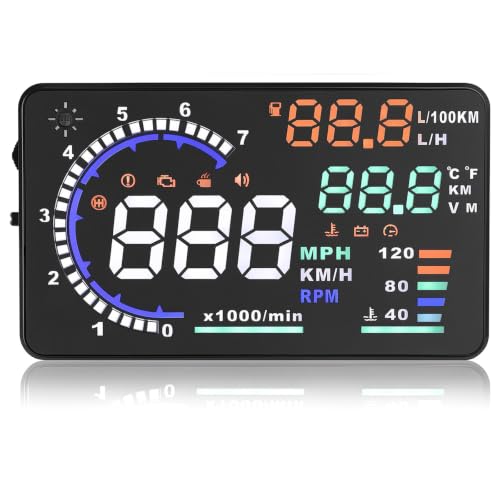
Best Large-Screen OBD2 Display – 5.5-Inch Multi-Function HUD
This 5.5-inch model is a practical option among professional heads-up car displays for drivers who want several metrics visible at once. It shows speed, RPM, water temperature, voltage, fuel consumption, and trip distance, with automatic brightness control and multiple warning alerts.
Best For: Drivers of compatible gasoline vehicles made after 2008 who want a large, information-rich OBD2 display.
Pros:
- Large screen shows key driving data simultaneously.
- Includes overspeed, over-rev, engine-failure, fatigue, low-voltage, and over-temperature alerts.
- Plug-and-play installation uses the vehicle’s OBD port.
- Automatically adjusts brightness and supports manual fine-tuning.
Cons:
- Compatibility is limited to many OBDII/EOBD gasoline vehicles from after 2008.
- It does not support listed diesel, hybrid, pickup, RV, or modified-ECU vehicles.
- Buyers should verify compatibility because several vehicle makes and models are specifically excluded.
This unit offers a strong feature set for compatible cars, especially if you value a large display and layered alerts. Compatibility checking is essential before purchase.
Best GPS Speed-Focused Pick – GPS/BeiDou Digital HUD
For a straightforward speed-reading solution, this GPS model is one of the more focused professional heads-up car displays. It uses GPS and BeiDou satellite signals, presents oversized speed digits at a 10Hz refresh rate, and connects through USB-C without requiring an OBD port.
Best For: Drivers of cars, SUVs, and trucks who primarily want a readable GPS speed display with automatic lighting and speed warnings.
Pros:
- Uses GPS and BeiDou satellite reception for speed data.
- Large, smooth 10Hz display is designed for quick reading.
- Anti-glare hood helps reduce high-beam and nighttime glare.
- Includes automatic dimming, KM/MPH switching, and triple overspeed warnings.
Cons:
- It focuses on GPS speed rather than displaying broad engine diagnostics.
- Its stated warranty is limited to three months.
- USB-C power must be available in the vehicle.
This is a sensible choice when speed visibility matters more than engine data. Its compact design, automatic on/off operation, and satellite-based reading make installation simple across a wide range of vehicle types.
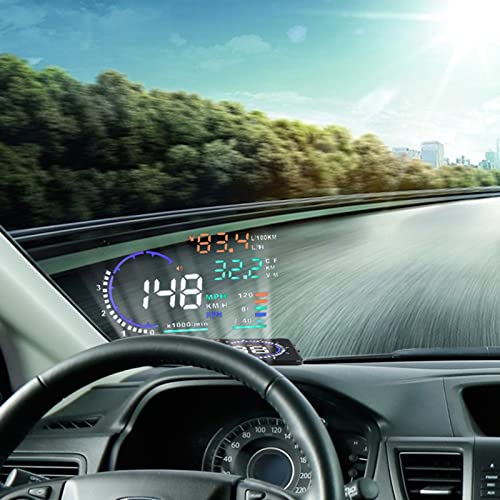
Best Alert-Rich OBDII Option – 5.5-Inch Multi-Color HUD
This 5.5-inch unit gives drivers a broad view of vehicle information without looking down at the instrument cluster. As one of the professional heads-up car displays with multiple alerts, it shows speed, engine speed, temperatures, voltage, fuel consumption, mileage, and fault codes through an OBDII or EUOBD connection.
Best For: Drivers with compatible OBDII or EUOBD vehicles who want diagnostic information and configurable driving reminders.
Pros:
- Displays speed, RPM, water temperature, voltage, fuel use, mileage, and fault codes.
- Supports automatic and manual brightness adjustment.
- Provides overspeed, fatigue, high-temperature, low-voltage, and shift reminders.
- Automatically powers on and off with the vehicle.
Cons:
- It requires an OBDII or EUOBD-compatible vehicle.
- The supplied notes do not specify a detailed vehicle compatibility list.
- It offers fewer installation details than some newer plug-and-play models.
This HUD is appealing for drivers who want a mix of speed visibility, vehicle monitoring, and reminder alerts. Confirming the car’s OBD compatibility before ordering will help avoid installation issues.
Most Versatile Dual-Mode Pick – M7 OBD/GPS Smart HUD
For drivers comparing professional heads-up car displays, this M7 stands out for combining OBD and GPS operation. It can show speed, voltage, water temperature, and driving distance, while selectable units and automatic brightness adjustment make it practical for varied driving conditions.
Best For: Drivers who want vehicle data beyond speed and need GPS fallback compatibility.
Pros:
- Offers both OBD and GPS modes.
- Displays speed, voltage, water temperature, and driving distance.
- Includes speed, temperature, and voltage alerts.
- Automatically adjusts display brightness.
Cons:
- OBD II mode generally applies to vehicles manufactured after 2008.
- OBD II is not compatible with electric, diesel, pickup, RV, or computer-modified vehicles according to the supplied notes.
- GPS mode provides fewer data points than OBD mode.
The M7 is a flexible choice when compatibility and expanded engine information matter. Check your vehicle type carefully and use GPS mode where OBD limitations apply.
Best USB Simplicity – H4 GPS HUD with 10Hz Refresh
This H4 is a straightforward option among professional heads-up car displays, using USB power and GPS positioning rather than vehicle-specific OBD connectivity. Its large speed display, 10 Hz refresh rate, satellite reception, and automatic brightness adjustment are designed for easy at-a-glance reading.
Best For: Drivers who want plug-and-play speed information in a car, truck, or motorcycle with a USB port.
Pros:
- USB plug-and-play installation suits vehicles with a USB port.
- Uses GPS and BDS signals with a stated 10 Hz refresh rate.
- Large, anti-reflective display shows speed in MPH by default.
- Automatic brightness adjustment and speeding alert add convenience.
Cons:
- GPS speed may have a normal stated margin of error of 0.6–1.8 mph.
- Signal interruptions can occur in tunnels, underground garages, and some weather conditions.
- Metalized or metal-film windshield treatments may affect reception.
The H4 favors simple installation and readable speed information over extensive vehicle diagnostics. It is a practical fit for drivers comfortable with GPS-based readings and the limitations of satellite reception.
Best Flat-Screen Design – M22 GPS Windshield Speedometer
For shoppers evaluating professional heads-up car displays with a compact projected-style layout, the M22 combines a flat screen with a reflective film for windshield viewing. It displays speed, clock, travel time, distance, and compass direction, with automatic startup and an overspeed warning.
Best For: Drivers who want a simple GPS display with travel information, automatic operation, and a windshield-reflection setup.
Pros:
- Displays speed, clock, travel time, and distance traveled.
- Includes overspeed alert and GPS compass.
- Supports MPH and KM/H settings.
- Turns on and off automatically with the vehicle.
Cons:
- Speed appears only after the device locates satellites.
- Garages, overpasses, dense buildings, and metal film can slow GPS reception.
- The reflective film or manual brightness adjustment may be needed for clearer daytime viewing.
The M22 is appealing if you value a tidy, information-focused display rather than engine diagnostics. Its GPS dependence makes placement and open-sky reception important to the overall experience.
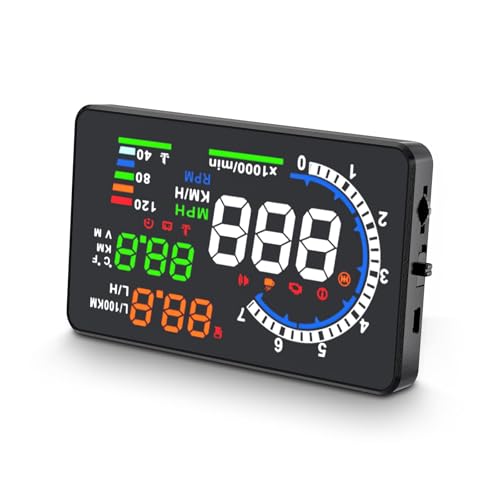
Best OBD Data Display – wiiyii A8 5.5-Inch Car HUD
For drivers seeking professional heads-up car displays with broad vehicle data, the wiiyii A8 combines a large 5.5-inch HD screen with OBD-based readouts. It shows speed, water temperature, voltage, driving distance, and selectable warning information, but compatibility should be confirmed before purchase.
Best For: OBDII- or EOBD-equipped vehicles whose drivers want more than a basic speed display.
Pros:
- Large 5.5-inch, 800×480 display is designed for easier viewing.
- Shows speed, RPM, water temperature, voltage, and driving distance.
- Includes speeding and voltage alarms, plus kilometer/mile switching.
- Can read certain vehicle fault information and support fault clearing.
Cons:
- Only supports OBDII and EOBD systems; it does not support OBD I or JOBD.
- OBD compatibility varies by vehicle and production year.
The A8 is a strong choice when vehicle diagnostics and multiple engine readouts matter as much as speed. Its main limitation is the need to verify the car’s supported OBD standard before ordering.
Best GPS Windshield Display – K1 USB Car HUD
This GPS model is among the more flexible professional heads-up car displays because it uses USB power rather than an OBD connection. Dual GPS+BDS positioning, a 10Hz refresh rate, automatic brightness adjustment, and a large speed readout make it practical for everyday driving.
Best For: Drivers who want a simple speed display for a car, truck, or motorcycle with a USB port.
Pros:
- Uses dual-mode GPS+BDS positioning and connects with up to 32 satellites.
- USB-powered and compatible with most USB-equipped cars, trucks, and motorcycles.
- Automatic brightness adjustment helps accommodate daytime and nighttime viewing.
- Large MPH display and anti-reflective shading support quick glances.
Cons:
- GPS speed can differ from the vehicle display by approximately 0.6–1.8 MPH.
- Signal performance may be affected in tunnels, garages, severe weather, or behind metallic windshield film.
- The listed default display is MPH; the supplied notes do not specify a unit-switching function.
The K1 prioritizes easy installation and readable GPS speed rather than vehicle diagnostics. It is a sensible fit when USB convenience and automatic brightness are more important than OBD data.
Best Adjustable GPS HUD – K4 USB Speed Display
The K4 is a practical option among professional heads-up car displays for drivers who want more control over speed presentation. It adds MPH/KM/H switching, manual calibration, adjustable brightness, and a customizable overspeed alert to its GPS-based readout.
Best For: Drivers who want a USB-powered GPS HUD with flexible units, calibration, and speed warnings.
Pros:
- Dual GPS+BDS positioning with a 10Hz refresh rate supports responsive speed tracking.
- Switches between MPH and KM/H for regional or personal preferences.
- Manual speed calibration can help align the readout with the vehicle dashboard.
- Offers adjustable brightness and a customizable overspeed alert.
Cons:
- GPS reception may be interrupted or reduced in tunnels, underground garages, heavy rain, fog, or behind metallic windshield film.
- It is powered through a cigarette-lighter port, so placement depends on that connection.
- The supplied notes do not indicate vehicle diagnostic or engine-data readings.
Compared with a basic GPS speedometer, the K4 stands out for its calibration, unit switching, and overspeed warning. Choose it when those controls are useful, while keeping normal GPS signal limitations in mind.
How We Picked These Professional Heads-Up Car Displays
We focused on the features that matter during everyday driving: readable projection, dependable speed data, straightforward setup, useful warning functions, and compatibility with different vehicles. The selection includes both OBD2 displays, which can access vehicle data directly, and GPS models, which are generally easier to install across a wider range of cars.
We also considered display size, brightness adjustment, unit switching, overspeed alerts, cable simplicity, and whether the design is practical for commuting or longer trips. Because product specifications can vary by seller and model revision, confirm the supported vehicle years, connector type, and included accessories before ordering.
Quick Comparison
OBD2 models: A good choice when you want vehicle-linked information and your car has a compatible OBD2 or EUOBD port. Installation is usually plug-and-play, but compatibility is more limited.
GPS models: These are flexible and often work in older vehicles, motorcycles, rentals, or cars without usable OBD2 data. They may need time to acquire a satellite signal and should be positioned where the receiver has a clear view.
Feature-rich displays: Models with automatic light sensors, color choices, overspeed alarms, and larger screens are useful if you drive in varied lighting or want information that is easier to read at a glance.
Key Buying Factors for Professional Heads-Up Car Displays
Compatibility and Data Source
Check whether the display uses OBD2, GPS, or both. OBD2 units may offer more vehicle-specific information, while GPS units provide broad compatibility. Confirm that your vehicle supports the required protocol and model year.
Visibility and Placement
A sharp, bright projection is more useful than a long feature list. Look for adjustable brightness, color options, a reflective film or suitable dashboard surface, and a viewing angle that does not obstruct the road. Automatic dimming can improve comfort at night.
Accuracy and Alert Controls
Speed readings should be stable and easy to interpret. Overspeed warnings are helpful when they can be adjusted to your preference rather than triggering at an unsuitable limit. Remember that displayed speed may differ slightly from the vehicle’s speedometer or local enforcement equipment.
Installation and Power
Prioritize a tidy cable layout, secure mounting, and controls that can be adjusted without distracting you. Avoid placing the unit where it blocks visibility, interferes with airbags, or creates reflections that make night driving harder.
Who Should Buy Which Professional Heads-Up Car Displays?
Choose an OBD2 HUD if you drive a compatible gas vehicle and want simple installation with vehicle-connected readings. Choose a GPS HUD if broad compatibility is more important or you frequently use different vehicles.
Choose a larger, multi-color model if readability is your priority, especially for older eyes or bright daytime driving. Choose a compact basic display if you only need speed and a simple overspeed alert without extra visual clutter.
Whichever style you choose, verify compatibility, test the display in both daylight and darkness, and position it so the information is visible without taking attention away from the road.
