

10 Best USB OBD Adapters for BMW Laptops in 2026: Coding, Diagnostics, and Model-Ready Picks

Choosing the right adapter matters if you want your BMW laptop software to connect cleanly, read modules accurately, and avoid frustrating communication errors.
This roundup focuses on the most useful options for BMW owners, from legacy K-DCAN and 20-pin solutions to modern ENET cables for F- and G-Series coding.
Best 10 USB Obd Adapter for Bmw Laptop Picks for 2026
Best for BMW E-Series Coding
K DCAN USB OBD2 Cable for BMW Coding

- FTDI chip for dependable Windows diagnostics
- K-Line/DCAN switch for older and newer E-Series
- Works with INPA, ISTA+, NCS Expert, and more
Best For: DIY BMW owners using a Windows laptop for E-Series coding and diagnostics.
Best for FORScan
Vgate vLinker FS USB OBD2 Adapter

- ELM327-compatible USB adapter
- Supports 12V/24V OBD2 vehicles
- Wired laptop connection for diagnostics
Best For: Users who want a simple USB diagnostic adapter for compatible OBD2 laptop software and basic vehicle scanning.
Best for BMW Coding
OHP ENET OBD2 Cable for F-Series
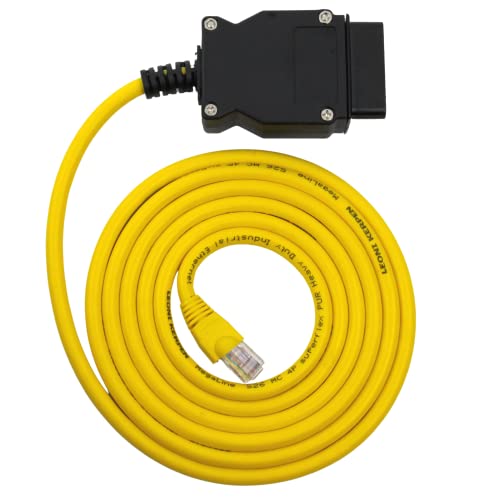
- Supports Bimmercode, E-SYS, ISTA+, and other BMW tools
- Stable shielded Ethernet-to-OBD2 connection for coding
- Ideal for F-, I-, and G-series BMW laptops workflows
Best For: BMW owners using a laptop for coding, diagnostics, and feature activation on supported newer BMW models.
Best for High-Power Charging

- 65W USB-C plus 36W USB-A dual-output charging
- Works with 12V and 24V vehicles
- Built-in protection for safer everyday use
Best For: BMW owners who want OBD-powered charging for a laptop, phone, or dash cam.
Best for BMW Laptop Coding
ENET Cable BMW + USB-C Adapter

- USB-C and USB-A adapters included
- Supports BMW coding tools like E-SYS and ISTA+
- Durable CAT5e cable with shielded connectors
Best For: BMW owners using a laptop for coding, diagnostics, and CarPlay activation.
Best BMW 20-Pin Autel Pick
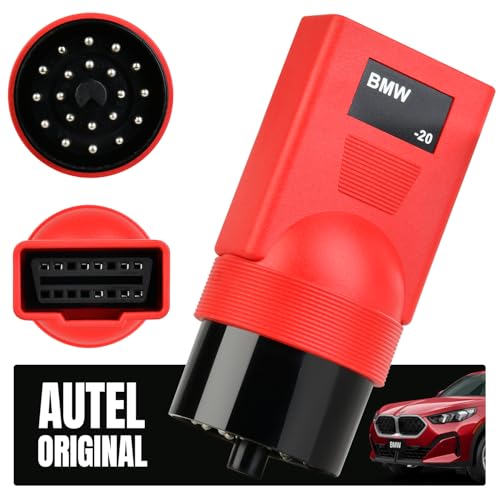
- Bridges BMW 20-pin OBD1 ports to 16-pin OBD2 scanners
- Designed for Autel tools and older BMW chassis
- Good choice for full-system access on supported vehicles
Best For: BMW owners with older 20-pin cars who already use an Autel scanner.
Best for Comfort
Enet OBD2 Cable with USB-C Adapter

- Includes ENET cable plus USB-C adapter
- Supports popular BMW coding and diagnostic apps
- Sized for laptop-based F/G-series work
Best For: BMW owners who need a laptop-friendly ENET cable for coding and diagnostics on supported models.
Best for Ford Coding
OBD2 to USB ELM327 Diagnostic Cable
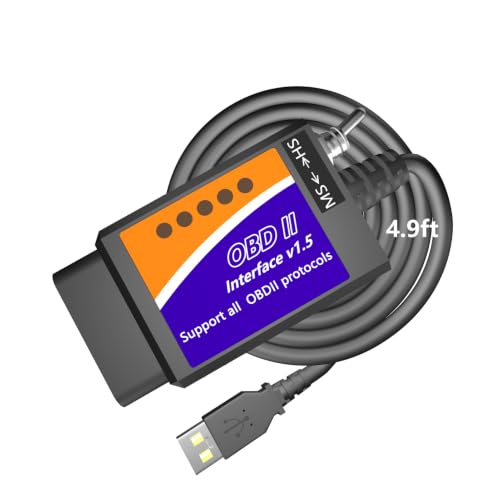
- Reads and clears OBD2 trouble codes
- Supports Windows laptop diagnostic software
- Adds Ford-specific coding features
Best For: Windows laptop users who want a basic OBD2 cable, especially Ford owners interested in coding.
Best for BMW E-Series Coding – K DCAN USB OBD2 Cable for BMW Coding
If you want a practical usb obd adapter for bmw laptop use, this K+DCAN cable is a straightforward pick for BMW coding and diagnostics on older E-Series cars. It supports common tools like INPA, NCS Expert, ISTA+, and Rheingold, and the built-in K-line/DCAN switch helps match the cable to different model years.
Best For: BMW owners who need a Windows-based cable for coding, diagnostics, and service functions on 1998–2016 E-Series models.
Pros:
- FTDI chip for stable connection and broad BMW software compatibility
- Flip switch supports both K-Line and DCAN modes
- Works with many popular Windows BMW tools, including INPA and ISTA+
- Covers a wide range of E-Series chassis from 1998–2016
Cons:
- Windows only, so it is not a Mac or mobile option
- Best suited to E-Series BMWs rather than newer G-Series models
- May require software setup and driver installation before use
Overall, this is a solid usb obd adapter for bmw laptop setups if you mainly work on E-Series cars and want a cable that supports both diagnostics and coding. It is especially appealing for DIY owners who value software compatibility and the simple K-Line/DCAN switch.
Best for FORScan – Vgate vLinker FS USB OBD2 Adapter
If you need a practical usb obd adapter for bmw laptop use, the Vgate vLinker FS is worth a look for OBD2 software that supports ELM327-compatible interfaces. It’s built for 12V/24V vehicles with a standard OBD2 port, so it fits the basic plug-in diagnostic role many laptop-based users want.
Best For: Laptop diagnostics with FORScan-style apps and basic OBD2 reading on compatible BMW and other OBD2 vehicles.
Pros:
- ELM327-compatible for broad app support
- Works with 12V/24V OBD2 vehicles
- Auto-switching HS/MS-CAN support for Ford-focused use
- Simple wired USB connection for laptop-based diagnostics
Cons:
- Requires software that supports both your vehicle and ELM327 devices
- Not a BMW-specific coding tool
- FORScan features are more relevant to Ford-family vehicles than BMW
For a usb obd adapter for bmw laptop setups, this is a sensible general-purpose option if your software stack is compatible, but BMW buyers should confirm app and protocol support before relying on it for coding or advanced diagnostics.
Best for BMW Coding – OHP ENET OBD2 Cable for F-Series
If you need a usb obd adapter for bmw laptop that’s aimed at coding rather than basic code reading, this OHP ENET cable is built for BMW F-, I-, and G-series work. It connects over Ethernet-to-OBD2 for apps like Bimmercode, E-SYS, ISTA+, and INPA, making it a practical pick for retrofits, module changes, and diagnostics from a Windows laptop.
Best For: BMW owners using a laptop for coding, diagnostics, and feature activation on supported F-, I-, and G-series models.
Pros:
- Works with popular BMW coding and diagnostic software, including Bimmercode and ISTA+
- Shielded CAT5e construction with gold-plated RJ45 for stable data transfer
- Good fit for F-series, I-series, and G-series BMWs that need ENET connectivity
- Backed by a 2-year warranty for extra peace of mind
Cons:
- Not compatible with BMW E-series models
- Windows only, unless you use a MacBook with a virtual machine
- More specialized than a simple universal OBD2 reader
For BMW owners who want a reliable usb obd adapter for bmw laptop use, this cable makes sense when your goal is coding and programming rather than generic diagnostics. It’s a strong match if you need ENET support and plan to work mainly with newer BMW chassis.
Best for High-Power Charging – 65W OBD2 USB-C Adapter
If you need a usb obd adapter for bmw laptop use cases that also handles phones, tablets, or dash cams, this 65W OBD2-to-USB adapter is a practical pick. It taps the car’s OBD port and offers both USB-C and USB-A output, with enough power for fast charging and steady accessories in 12V or 24V vehicles.
Best For: BMW owners who want a compact OBD-powered charger for a laptop, phone, or dash cam setup during travel or diagnostics.
Pros:
- 65W USB-C output plus a 36W USB-A port for charging two devices
- Supports common fast-charge protocols and 12V/24V vehicles
- Built-in over-voltage, over-current, short-circuit, and over-temperature protection
- Compact design with rear-facing ports to reduce leg interference
Cons:
- Requires the engine to be running for safe fast charging
- OBD-port power is better for charging than for dedicated laptop workstations
- Not a replacement for a true car laptop inverter in higher-demand setups
This is a useful option if you want a usb obd adapter for bmw laptop charging without adding a bulky inverter, especially when you value compact installation and dual-device support over maximum workstation flexibility.
Best for BMW Laptop Coding – ENET Cable BMW + USB-C Adapter
If you need a usb obd adapter for bmw laptop use, this ENET cable kit is built for BMW F/G/i series coding, diagnostics, and module access. It includes USB-C and USB-A adapters, so it works well with newer and older laptops while supporting common tools like E-SYS, ISTA+, BimmerCode, and Bootmod3.
Best For: BMW owners who want a laptop-ready ENET cable for coding, CarPlay activation, and routine module work on compatible F- and G-series models.
Pros:
- Includes both USB-C and USB-A adapters for broader laptop compatibility
- Heavy-duty CAT5e build with gold-plated, shielded connectors
- Works with popular BMW coding and diagnostic software
- Designed for BMW F, G, i series, and other supported models
Cons:
- BMW-specific tool, so it is not useful for most other car brands
- Requires compatible software and basic coding knowledge
- Not a universal plug-and-play OBD scanner
Overall, this is a strong usb obd adapter for bmw laptop setups if you want a durable cable with both USB connector types included. It is a better fit for coding-focused users than casual drivers who only need basic fault-code reading.
Best BMW 20-Pin Autel Pick – Autel BMW 20-Pin OBD2 Adapter
If you need a usb obd adapter for bmw laptop-style diagnostics, this Autel 20-pin adapter is the right kind of bridge for older BMWs that don’t have a standard OBD-II port. It doesn’t scan by itself, but it lets a compatible Autel tool connect to many pre-OBD2 BMW models for deeper system access.
Best For: BMW owners with 20-pin cars who already use an Autel scanner and want to connect to older chassis without a factory OBD-II socket.
Pros:
- Works with BMW 20-pin OBD1-style diagnostic ports
- Compatible with a wide range of older BMW chassis, including E28 through E46
- Supports Autel scanners for advanced functions like full-system diagnostics and coding
- Simple adapter-only design with no setup beyond the supported scanner
Cons:
- Does not perform diagnostics on its own
- Primarily intended for Autel scanners, not most other brands
- Only useful for BMWs with the 20-pin diagnostic connector
For BMW owners working with older models, this is a practical usb obd adapter for bmw laptop workflows only if your scanner is already compatible. It’s a solid pick when you need the right physical connection more than a standalone diagnostic tool.
Best for Comfort – Enet OBD2 Cable with USB-C Adapter
If you want a practical usb obd adapter for bmw laptop use, this ENET cable bundle is aimed at BMW coding and diagnostics rather than generic scan-tool work. It includes the Ethernet-to-OBD cable plus a USB-C adapter, making it easier to connect a laptop setup for E-SYS, ISTA+, BimmerCode, Bootmod3, and similar software on supported BMW F/G-series models.
Best For: BMW owners who need a laptop-friendly ENET cable for coding, module access, and supported diagnostics on F- and G-series cars.
Pros:
- Includes both the ENET cable and USB-C to Ethernet adapter
- Works with common BMW coding and diagnostic software
- 6.5ft/2m length is handy for laptop-based garage use
- Built with CAT5e-style materials and shielded connectors
Cons:
- Only works with supported BMW models, mainly F- and G-series
- Requires separate BMW software; the cable alone does not program the car
- Not a universal OBD adapter for all vehicles
For buyers focused on BMW-specific laptop coding, this bundle is a straightforward choice that removes the need to source a separate adapter. If your goal is a usb obd adapter for bmw laptop use with supported software, it offers the right mix of convenience and compatibility—just verify your model and software before buying.
Best for BMW Motorcycles – JUTA 10-Pin to 16-Pin OBD2 Adapter
If you need a usb obd adapter for bmw laptop setups, this JUTA cable is a straightforward way to connect a BMW motorcycle’s round 10-pin diagnostic port to standard OBD2 tools. It’s aimed at riders and DIY mechanics who want to read codes, check live data, and handle service resets with compatible software or scanners.
Best For: BMW motorcycle owners with a 10-pin diagnostic socket who want to use OBD2 scanners, MotoScan, or laptop-based diagnostic software.
Pros:
- Fits BMW motorcycles with the round 10-pin port from roughly 1996 to 2016
- Works with common tools like ELM327, K-Line, DCAN, ISTA-D, ISTA-P, and MotoScan
- 2 ft cable length gives enough reach for garage diagnostics
- Built with 20AWG materials and a molded plug for a sturdier connection
Cons:
- Adapter only; you still need a compatible scanner or laptop software
- Designed for BMW motorcycles, so it won’t fit standard car OBD use cases
- Software and feature support can vary by diagnostic tool
For BMW riders who already have diagnostic software or a scanner, this is a practical connector cable rather than a full interface. If your goal is a reliable usb obd adapter for bmw laptop diagnostics, it’s a good fit as long as your tools support the BMW motorcycle platform.
Best for BMW F & G Series Diagnostics – ENET OBD2 USB-C Cable for BMW
If you need a usb obd adapter for bmw laptop use, this ENET cable is built around BMW F- and G-series diagnostics with support for ISTA+, E-SYS, and ICOM workflows. It’s a practical pick for owners who want a wired connection for coding, scanning, and maintenance on compatible BMW models.
Best For: BMW owners and DIY diagnosticians working on F- and G-series vehicles who want a straightforward USB-C ENET setup for laptop-based diagnostics.
Pros:
- Compatible with BMW F-Series and G-Series diagnostic software like ISTA+ and E-SYS
- Includes a USB-C adapter for newer laptops and mobile devices
- Gold-plated, shielded connectors help support stable data transfer
- 6.6 ft / 2 m cable gives comfortable reach during garage use
Cons:
- Requires Windows on Mac for full software compatibility
- Only works with supported BMW models and diagnostic setups
Overall, this is a solid usb obd adapter for bmw laptop users who want a cable-focused diagnostic tool rather than a wireless solution. It stands out most for BMW-specific compatibility and the included USB-C adapter, making it easier to pair with modern devices.
Best for Ford Coding – OBD2 to USB ELM327 Diagnostic Cable
If you want a practical usb obd adapter for bmw laptop use as well as general OBD2 diagnostics, this USB ELM327 cable is built for Windows-based scanning and code reading. It covers common check-engine tasks like reading and clearing fault codes, viewing live data, and checking readiness monitors, while also supporting a wider range of 12V vehicles after 1996.
Best For: Drivers who mainly want a USB OBD2 cable for Windows laptop diagnostics, with extra value for Ford owners who want access to coding and personalization features.
Pros:
- Reads and clears trouble codes, freeze-frame data, and live sensor data
- Supports Windows laptop software for broad OBD2 diagnostics
- Includes Ford-specific coding and modification features
- Works with many 1996+ 12V cars, SUVs, pickups, and light trucks
Cons:
- BMW support is limited to standard OBD2 functions, not brand-specific coding
- Mac users need a Windows emulator or Boot Camp setup
- Some advanced software features may require separate paid apps
For buyers comparing a usb obd adapter for bmw laptop use, this is a solid low-cost diagnostic cable rather than a BMW-specialized coding tool. It makes the most sense if you need simple scan-and-clear functionality on a laptop and also like the idea of Ford programming support.
How We Picked the Best USB Obd Adapter for Bmw Laptop
We prioritized adapters that match real BMW use cases: coding, diagnostics, and module access through popular laptop tools such as INPA, ISTA+, E-SYS, Bimmercode, and similar software. Compatibility by chassis, connector type, and software support mattered more than marketing claims.
We also looked for build quality, connector fit, cable length, and whether the adapter is suited to older E-Series cars, newer F/G-Series models, or specialty BMW motorcycles. For a USB Obd Adapter for Bmw Laptop, stable communication is more important than extra features you may never use.
Quick Comparison
In simple terms, K-DCAN cables are best for many older BMWs, ENET cables are the go-to for many F- and G-Series coding setups, 20-pin adapters help with older under-hood diagnostics, and generic USB OBD cables are better for broad OBD-II reading than BMW-specific coding.
If you need one adapter for several BMW generations, verify your vehicle’s chassis first, then match the cable to the software and port style. That step prevents most compatibility mistakes.
Key Buying Factors for a USB Obd Adapter for Bmw Laptop
1. Vehicle Chassis and Connector Type
BMW platforms vary widely. E-Series cars often use K-DCAN or 20-pin solutions, while many F- and G-Series vehicles rely on ENET. Some older models and motorcycles need unique adapters, so the port type should drive your choice.
2. Software Compatibility
Make sure the adapter works with your intended program. Some cables are aimed at coding apps, while others are better suited to diagnostics. A USB Obd Adapter for Bmw Laptop should support the software you already plan to use, not just “USB OBD2” in general.
3. Driver and Windows Support
Most BMW laptop setups are Windows-based. Confirm that the adapter has reliable driver support and is known to communicate well with your laptop version, especially if you use older diagnostic suites.
4. Build Quality and Connection Stability
Loose connectors or poor shielding can cause dropped sessions, failed reads, or coding interruptions. For BMW coding, a solid cable is worth more than a cheap all-purpose scanner lead.
Who Should Buy Which USB Obd Adapter for Bmw Laptop?
If you drive an older E-Series BMW, a K-DCAN-style cable is usually the most practical starting point. If you own an F- or G-Series car and want coding flexibility, an ENET cable is often the better fit. If you maintain an older BMW with a 20-pin diagnostic port, choose the matching adapter instead of forcing a newer cable to work.
For owners who mainly want basic OBD-II code reading on a laptop, a generic USB OBD adapter may be enough, but it is not always the best choice for BMW-specific coding tasks. Match the adapter to your chassis, software, and diagnostic goals, and you’ll get a smoother setup with fewer connection problems.
