

Innova SD35 OBD2 Scanner Review 2026: All-system diagnostics for DIY repairs

If you want an OBD2 scanner that goes beyond basic check-engine codes, the Innova SD35 review is about fit, not flash.
It is aimed at drivers who want deeper diagnostics, live data, and repair guidance in one handheld tool.
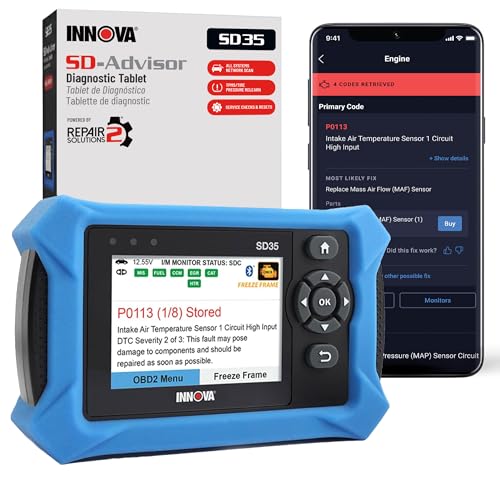
Innova SD35 OBD2 Scanner Review Summary
The Innova SD35 makes sense for DIY owners who want a more capable scanner than a simple code reader but do not want to juggle multiple apps and add-ons.
Based on the listing, it is built for all-system diagnostics, live data, TPMS checks, oil reset functions, and battery or alternator testing, which gives it a broader role in home garage troubleshooting.
It is especially relevant if you work on newer or mixed-fleet household vehicles and want one scanner that can help you move from symptom to diagnosis.
The main tradeoff is coverage variability: the listing repeatedly notes that vehicle and feature support may differ, so this is a strong pick only if you verify compatibility first.
Review Scorecard
| Category | Score | Why it matters |
|---|---|---|
| Diagnostic depth | 9/10 | All-system scanning and live data go well beyond basic OBD2 code reading. |
| DIY usability | 8/10 | Tablet-style interface and app guidance should suit home mechanics. |
| Vehicle coverage | 7/10 | Broad support is listed, but feature availability can vary by vehicle. |
| Service functions | 8/10 | TPMS checks and oil reset features add real maintenance value. |
| Repair guidance | 8/10 | Verified fixes and suggested parts can help narrow next steps. |
| Value for money | 8/10 | The feature set is strong for buyers who need more than a simple reader. |
| Long-term usefulness | 8/10 | Live data, system scans, and service resets make it useful beyond emergencies. |
Key Features and Specifications of Innova SD35
The Innova SD35 is a tablet-based OBD2 scanner from Innova, identified in the product data as model 35 and part number SD35.
It comes with an OBD2 cable and a 1-year limited warranty.
The core appeal is breadth.
The listing says it can read and clear check engine, ABS, SRS, and TPMS codes, while also scanning engine, transmission, ABS, SRS, and other systems.
It also surfaces live data such as RPM, fuel trims, temperature readings, and oxygen sensor performance.
Other supported functions listed include:
- Battery and alternator testing
- TPMS sensor checks
- Oil light reset and other service resets
- Verified fixes through the RepairSolutions2 app
- Suggested parts and cost estimates
The product is described as compatible with 1996 and newer cars and trucks, including common brands such as Toyota, Ford, Honda, Chevrolet, Nissan, and Dodge.
That said, the listing also warns that vehicle coverage may vary, so the compatibility checker matters here.
The listed hardware and support details are straightforward:
| Spec | Detail |
|---|---|
| Brand | Innova |
| Model | SD35 / 35 |
| Included components | OBD2 cable |
| Warranty | 1-year limited warranty |
| App support | RepairSolutions2 on iPhone and Android |
Pros and Cons of Innova SD35
Pros
- Broader than a basic code reader. All-system diagnostics and live data give it real diagnostic depth.
- Useful for maintenance tasks. TPMS checks and oil reset features add practical everyday value.
- Repair help is built in. The listing’s verified fixes and part suggestions are helpful for DIY troubleshooting.
- Tablet-style interface should be easier to use. A larger display usually helps when comparing readings or moving through menus.
- No subscription is a plus. The listing explicitly says the app guidance comes without extra fees or hidden subscriptions.
Cons
- Compatibility is not universal. The product page repeatedly says coverage can vary by vehicle and feature.
- It may be more scanner than some buyers need. If you only want to clear an engine light, this is probably overkill.
- You still need to verify support first. The best value comes only when your vehicle’s systems are fully covered.
Who Should Buy Innova SD35?
The Innova SD35 is a good fit for DIY drivers who want to diagnose more than a check-engine light.
If you regularly handle maintenance yourself and want access to live data, all-system scans, and service resets, this looks like the kind of tool that can earn its keep.
It also makes sense for owners of households with multiple vehicles, especially if those vehicles are among the common brands listed.
The built-in app guidance is another advantage for people who want a little extra direction after reading the fault code.
You should probably skip it if you only need a cheap emergency reader, or if you are not willing to check coverage before buying.
The SD35 is strongest when its broader diagnostics line up with your actual vehicle support.
Diagnostic Use Cases for Innova SD35
Reading More Than One System
The biggest advantage here is the move from single-code reading to all-system diagnostics.
That matters when a problem does not originate in the engine alone and you want to see whether ABS, SRS, transmission, or another system is contributing.
Using Live Data to Narrow Problems
Live data is one of the more valuable features on the listing because it helps you observe behavior instead of guessing from a stored code.
RPM, fuel trim, temperature, and oxygen sensor data are especially useful when symptoms are intermittent or the fault is not obvious.
Handling Routine Maintenance Jobs
The SD35 is also pitched as a maintenance helper, not just a failure reader.
TPMS checks and oil reset functions make it more relevant for drivers who do their own routine work and want one device that covers diagnostics plus common service tasks.
Getting Repair Guidance Without Subscription Friction
The RepairSolutions2 app adds a decision-making layer with verified fixes, suggested parts, and cost estimates.
That is useful if you want a guided next step after the code scan, and the no-subscription claim improves the long-term appeal.
Alternatives to Innova SD35
If you want to compare before buying, the most credible alternatives are other well-known scanner lines with similar DIY and pro-sumer positioning:
BlueDriver is a common comparison point if you want app-centered diagnostics.
Autel and Foxwell are worth checking if you want to compare feature depth and vehicle coverage across different scanner families.
FIXD is the simpler comparison if your use case is closer to occasional code reading than broader diagnostics.
Is Innova SD35 Worth It?
The Innova SD35 is worth it if you want a more capable scanner than a basic code reader and you will actually use the live data, all-system scans, TPMS checks, and reset functions.
It is also a better fit if you value guided repair help and want to avoid subscription-based add-ons.
It is not the right buy if you only need occasional engine-light checks or if you cannot verify coverage for your vehicle first.
For the right buyer, though, the SD35 looks like a practical, feature-rich DIY diagnostic tool rather than an unnecessary gadget.
