

OBD2 V321 Scanner Diagnostic Tool Review 2026: Deep vehicle checks and battery tests

If you want an OBD2 scanner review that focuses on actual buying value, the OBD2 V321 Scanner Diagnostic Tool is easy to judge.
It is built for drivers who want more than a basic code reader without stepping up to a full pro shop tool.
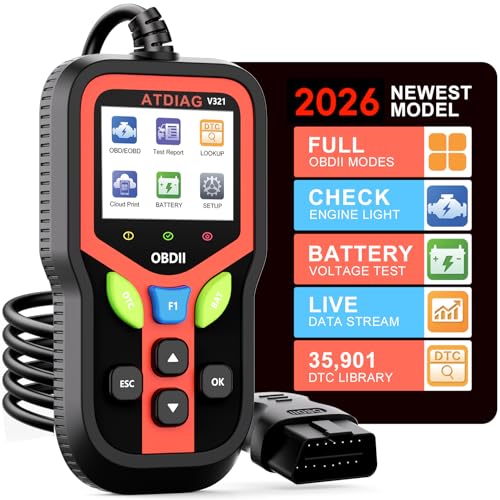
OBD2 Scanner Review Summary
The OBD2 Scanner Diagnostic Tool makes sense for anyone who wants a practical, plug-and-play way to interpret check-engine warnings, battery status, and basic live data.
Based on the listing, it is aimed at home mechanics, DIY drivers, and shops that need a compact scanner with a color display, multiple language support, and report-sharing features.
What stands out most is its mix of everyday functions: reading and clearing trouble codes, checking I/M readiness, viewing sensor data, running EVAP tests, checking battery health, and pulling freeze-frame data.
That is the kind of spread that makes a scanner feel useful instead of decorative.
The main tradeoff is that the listing leans on broad capability claims, so buyers should treat it as a feature-rich general diagnostic tool rather than a specialty device for advanced brand-specific diagnostics.
Review Scorecard
| Category | Score | Why it scores here |
|---|---|---|
| Code reading and clearing | 9/10 | Supports read/clear functions and a built-in fault-code library for broad everyday use. |
| Live diagnostic data | 8/10 | The listing promises real-time sensor data such as RPM, coolant temperature, and fuel pressure. |
| Battery and system checks | 8/10 | Includes battery health testing and BAT shortcut support, which adds practical value. |
| Ease of use | 9/10 | Plug-and-play setup, keyboard shortcuts, and a 2.4-inch color display lower the learning curve. |
| Compatibility | 8/10 | Covers most OBDII vehicles since 1996 in the US, 2000 in Europe, and 2008 in Asia. |
| Durability and portability | 8/10 | The rugged silicone case, insulated cable, and temperature range point to field-friendly design. |
| Overall buyer value | 8/10 | Strong feature set for common diagnostics without needing a complex professional platform. |
Key Features and Specifications of OBD2 Scanner
The OBD2 Scanner Diagnostic Tool is positioned as a compact, general-purpose diagnostic reader for standard OBDII vehicles.
The listing says it works with most cars manufactured after 1996 in the US, after 2000 in Europe, and after 2008 in Asia, as long as the vehicle has a standard 16-pin OBD2 port.
That is the right compatibility range for a lot of mainstream cars, but buyers should still verify their specific vehicle before ordering.
Key functions listed for this OBD2 Scanner include:
- Read and clear trouble codes
- Check I/M readiness status
- View real-time sensor data
- Run EVAP tests
- Check battery health
- Access freeze-frame data
- Generate vehicle health reports
- Print or share reports with a cloud-based QR code
The product listing also highlights a built-in library for decoding over 35,901 fault codes.
For a shopper, that suggests the scanner is designed to help decode more than the basics and give more context around warning lights.
The scanner also has support for 10 languages, including English, Spanish, French, and Portuguese, which makes it easier to use in mixed-language households or small shops.
Hardware and usability details matter here too.
The scanner has a 2.4-inch color display, keyboard shortcuts for fast access to key functions, and a rugged silicone case.
The cable is listed as a heat-resistant 3.0-foot insulated cable, and the unit is described as operating in temperatures from -22°F to 158°F.
Those are useful signs of a tool intended for a garage, driveway, or roadside bag instead of a desk-only accessory.
Pros and Cons of OBD2 Scanner
Pros
- Broad everyday diagnostic coverage for common OBDII use cases
- Reads and clears codes instead of just displaying them
- Live sensor data and freeze-frame support add real diagnostic value
- Battery health testing gives it more utility than a bare-bones reader
- QR-based report printing/sharing is useful for records or remote help
- Multiple language support improves accessibility
- Compact, rugged design should suit garage and field use
Cons
- The listing does not show vehicle-specific advanced functions, so buyers should not assume dealer-level depth
- Compatibility is broad, but not universal, so checking the car first still matters
- Some feature claims are marketing-heavy, so real-world usefulness will depend on how well the menus and code library are implemented
- The short cable and compact form factor are practical, but not ideal if you want a larger shop-style interface
Who Should Buy OBD2 Scanner?
The OBD2 Scanner is a good fit for drivers who want a dependable first diagnostic tool.
If your main goal is to understand why a check-engine light is on, confirm whether a code is present, check readiness monitors, or look at basic live data before visiting a mechanic, this kind of scanner is a sensible purchase.
It also fits DIY owners who like to verify repairs.
Being able to clear codes, recheck readiness, and inspect freeze-frame data helps turn a quick repair into something you can actually validate.
The battery test feature is another plus for people who deal with battery issues, seasonal starting problems, or vehicles that sit for long periods.
It is less attractive for buyers who need deep OEM diagnostics, module coding, or brand-specific service functions.
The listing supports a strong set of general-purpose features, but nothing in the evidence suggests it is built for advanced programming or highly specialized workflows.
If you only need a rare-use emergency reader, this may also be more tool than necessary.
How the OBD2 Scanner Handles Daily Diagnostics
Reading Fault Codes
The core strength of the OBD2 Scanner is straightforward fault-code work.
The listing emphasizes reading and clearing trouble codes, plus a fault-code library with more than 35,901 entries.
That combination is valuable because it helps users move from a dashboard warning to a more informed next step instead of guessing.
Live Data and Freeze Frames
Live sensor data is where a budget-to-midrange scanner becomes more than a code eraser.
This model lists RPM, coolant temperature, and fuel pressure among the real-time values it can show, and freeze-frame support adds context for what the car was doing when the fault appeared.
That is especially useful when the problem is intermittent.
Battery and EVAP Checks
Battery health testing makes the scanner more versatile than the simplest OBD2 tools.
It suggests the device can help separate charging or starting problems from engine-code issues, which is a practical benefit for everyday owners.
EVAP testing also matters because evaporative-system faults are common and often annoying to diagnose without scan support.
Reports and Sharing
The cloud-printing and QR-code report features look aimed at convenience.
If you like keeping records, sharing results with a repair shop, or sending code information to someone helping remotely, that can be a real workflow improvement.
It is not the headline feature, but it does make the scanner feel more modern and less disposable.
Alternatives to OBD2 Scanner
If you want a more established scan-tool family, look at the Autel AutoLink line.
Autel’s entry-level readers are common choices for buyers who want a familiar name and a broad feature range.
The BlueDriver is another strong alternative if you want a connected app experience and a well-known consumer diagnostic brand.
It is often a better fit for people who prefer phone-based workflows.
For buyers who want a simple handheld reader, the Innova OBD2 scanner range is worth a look.
Innova is often appealing when you want a straightforward interface and recognizable consumer support.
If you want more advanced professional-style features, the ANCEL OBD2 scanner lineup may be closer to your needs.
It is a reasonable comparison point for shoppers deciding how much tool they really need.
Is OBD2 Scanner Worth It?
Yes, if you want a practical OBD2 scanner for common car diagnostics. The OBD2 Scanner Diagnostic Tool offers a sensible mix of code reading, live data, battery checks, EVAP testing, and report sharing, which is exactly what many owners need most.
It is most worth it for DIY drivers, first-time scanner buyers, and anyone who wants a compact garage tool that can explain warning lights without much setup.
If you need deep OEM-level service functions or advanced programming, look higher up the tool ladder.
For ordinary diagnostics, though, this one looks like a solid, functional buy.
