

VDIAGTOOL VD10 OBD2 Scanner Review 2026: Simple code reading for DIY drivers

VDIAGTOOL VD10 OBD2 Scanner review is for drivers who want a no-frills way to read engine codes and check readiness without turning diagnosis into a project.
If you are asking whether the VDIAGTOOL VD10 OBD2 Scanner is worth it, the answer depends on whether you need dependable basics more than advanced service functions.
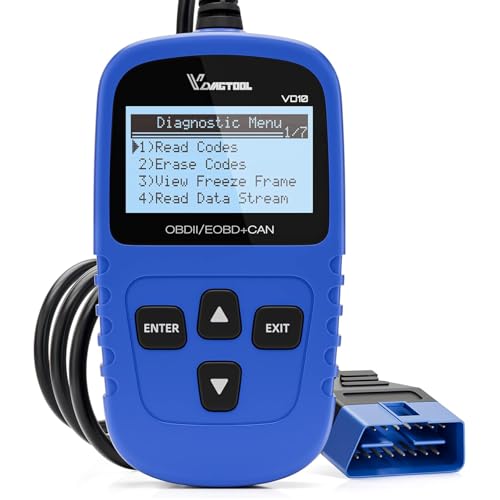
VDIAGTOOL VD10 OBD2 Scanner Review Summary
The VDIAGTOOL VD10 OBD2 Scanner is a sensible buy for DIY owners, used-car shoppers, and anyone who wants to understand a check-engine light before visiting a shop.
Its value is in fast access to core OBD2 tasks: reading and clearing codes, showing code definitions on the built-in screen, checking live data, viewing freeze frame information, and running I/M readiness checks.
It is not trying to replace a professional scan tool.
Instead, it focuses on the jobs most drivers actually need: find the code, understand the likely fault area, confirm monitor status, and clear a repaired code when appropriate.
That makes the VDIAGTOOL VD10 OBD2 Scanner a practical fit for people who want a direct handheld tool with minimal setup.
Review Scorecard
| Metric | Score | Why it scores this way |
|---|---|---|
| Ease of use | 9/10 | Plug-and-play operation, no battery or charger, and a simple two-line LCD make it approachable for beginners. |
| Core diagnostics | 8/10 | Reads and clears generic and manufacturer-specific codes, plus pending codes and code definitions. |
| Live data usefulness | 7/10 | Shows sensor and engine data needed for basic troubleshooting, but this is still a basic tool. |
| Readiness and inspection help | 9/10 | I/M readiness support is a strong fit for emissions checks and post-repair confirmation. |
| Vehicle compatibility | 8/10 | Broad OBDII support covers many post-1996 gasoline vehicles in the listed regions. |
| Used-car utility | 8/10 | VIN, calibration IDs, and CVNs can help verify ECU-related details when evaluating a vehicle. |
| Overall value for DIYers | 8/10 | It concentrates on the most useful entry-level functions rather than adding complexity. |
Key Features and Specifications of VDIAGTOOL VD10 OBD2 Scanner
The VDIAGTOOL VD10 OBD2 Scanner is built around the standard OBDII workflow.
It can read codes, clear codes, show freeze frame data, access live data, and display vehicle information.
The listing also says it retrieves built-in definitions for more than 3,000 codes, which reduces the need to look things up separately when you are standing next to the car.
Compatibility is one of its strongest selling points.
The listing states support for all major OBDII protocols, including CAN, ISO9141, KWP2000, J1850 PWM, and J1850 VPW.
It is described as compatible with 99% of OBDII-compliant vehicles, including post-1996 U.S. vehicles, post-2006 EU vehicles, and post-2009 Asian vehicles, as well as 12V cars, SUVs, and light trucks.
Other notable details:
- Two-line LCD with white backlight and contrast adjustment
- Plug-and-play design with no battery or charger required
- Reads generic codes and manufacturer-specific codes
- Supports pending codes and DTC lookup from the built-in database
- Displays freeze frame information tied to the fault
- Checks I/M readiness for emissions monitor status
- Can retrieve VIN, calibration IDs, and calibration verification numbers
The used-car angle matters here.
A scan tool that can show VIN and ECU-related information is more than a simple code reader, especially if you are checking whether a vehicle’s electronics behave as expected before buying it.
Pros and Cons of VDIAGTOOL VD10 OBD2 Scanner
Pros
- Very easy to start using. The listing emphasizes plug-and-play operation, which lowers the barrier for first-time users.
- Good coverage of daily-use functions. Reading codes, clearing codes, freeze frame, live data, and readiness checks cover the majority of common DIY needs.
- Built-in code definitions save time. You do not have to stop and search online for basic fault meaning every time.
- Useful for inspection prep. I/M readiness support is especially relevant if you need to verify monitor status after repairs.
- No power-management hassle. Since it does not need a battery or charger, it is simple to keep in the glove box or garage.
Cons
- Not a full-featured professional scan tool. Buyers needing advanced bi-directional controls or deep module access will outgrow it.
- Screen and interface are basic. The two-line LCD is functional, but it is not designed for rich data visualization.
- Best for OBDII-era vehicles. It is meant for listed OBDII-compatible cars, so it is not the right choice for older or noncompliant vehicles.
- Focused on engine diagnostics. The listing centers on engine fault reading and OBD2 functions, not broad systems coverage.
Who Should Buy VDIAGTOOL VD10 OBD2 Scanner?
The VDIAGTOOL VD10 OBD2 Scanner makes the most sense for a driver who wants a fast answer to a check-engine light.
If you maintain your own car, want to confirm whether a problem is minor or repair-worthy, or like to clear a code after fixing an obvious issue, this is the type of tool that belongs in the garage.
It is also a smart pick for people who prepare vehicles for inspection.
The I/M readiness feature helps you see whether emission monitors are set, which can prevent avoidable surprises at test time.
Used-car shoppers can benefit too, because the VIN and calibration data provide extra confirmation when a seller’s story needs a quick technical check.
You should probably skip it if you want a scan tool for:
- Active testing or advanced diagnostics
- Multiple system access beyond standard OBD2 engine functions
- Graph-heavy professional analysis
- Workshop use where richer data presentation matters more than simplicity
For those buyers, a more advanced scan platform will be a better long-term fit.
For everyone else, the VDIAGTOOL VD10 OBD2 Scanner is a focused, sensible handheld reader.
OBD2 Capability and Everyday Use
Reading and Clearing Codes
The core appeal of the VDIAGTOOL VD10 OBD2 Scanner is speed.
The listing says it can read generic and manufacturer-specific trouble codes, show definitions, and clear codes after repairs.
That is exactly the workflow most drivers need when the check-engine light comes on and they want to know what the car is telling them.
Live Data and Freeze Frame
Live data and freeze frame are important because they add context.
Freeze frame captures the conditions present when the fault was stored, and live data helps you watch sensor values while the engine is running.
For a basic handheld unit, that is a meaningful step up from a code reader that only displays a number and leaves you guessing.
I/M Readiness and Inspection Checks
I/M readiness is one of the most practical features in the listing.
If you have reset codes or repaired a fault, monitor status can tell you whether the car is likely ready for an emissions inspection.
That makes the VD10 more useful than a bare-bones reader that can only identify a problem after the fact.
Vehicle Info for Used-Car Checks
The ability to retrieve VIN, calibration IDs, and CVNs gives this tool a useful secondary role during used-car shopping.
It will not replace a full pre-purchase inspection, but it can help you verify electronic identity and spot obvious inconsistencies before money changes hands.
Alternatives to VDIAGTOOL VD10 OBD2 Scanner
If you want a different style of tool, the most credible alternatives are other established OBD2 reader lines:
Autel and ANCEL are good comparisons if you want a handheld reader with a similar basic-utility emphasis.
FIXD and BlueDriver are better to compare if you are deciding whether you want a phone-connected approach instead of a standalone screen.
The right choice comes down to whether you prefer simplicity, app-based convenience, or a more feature-rich diagnostic path.
Is VDIAGTOOL VD10 OBD2 Scanner Worth It?
Yes, if your goal is basic, reliable OBD2 diagnostics without extra complexity.
The VDIAGTOOL VD10 OBD2 Scanner is worth considering for DIY owners, commuters, and used-car buyers who want code reading, clearing, freeze frame, live data, and readiness checks in one simple handheld device.
It is less attractive if you expect advanced service functions or broad professional-level diagnostics.
But for the common job of understanding a check-engine light and confirming whether a repair changed the car’s status, it is a practical and easy-to-justify tool.
